I love Reddit Captions

Posted on 28 Mar 2008
OOXML, looking forward
I have been reading the OOXML storm in a teacup for more than a year now. Am looking forward to the approval of OOXML as an ISO standard and to be able to move the discussion back to the things that actually matter: free and open source software.
For a year, countless bytes have been wasted on what is now a very difficult plot to follow, specially for people that have not followed it since the start (or as Bill Maher said last week "Its like trying to make sense of a LOST episode". Note: am a Lost fan).
When we go back to what matters, we should be ready to ask IBM to open source its Lotus Notes software based on Open Office (as staunch supporters of open formats, and open source, I think its in their best interest to do so). There are nice components in Lotus Notes that would be nice to integrate into the upcoming OpenOffice 3.
But most importantly, it is a time for all of those strong advocates of open standards to stop talking, and start walking. I look forward for all that energy that went into discussing the pros and cons of OOXML to join an open source project and start contributing code, documentation, support, create support forums, file good bug reports and help us make free and open source software better.
In case you have not been noticing, Apple is gaining market share on the desktop. Some of our own kernel hackers, desktop hackers, web hackers that used to be Linux or BSD users are flocking to the proprietary OSX.
We need to change that, lets reverse that trend, and lets focus on what actually matters: the free and open source desktop. To make this happen we will need all the help that we can get.
Punditry and lobbying will not get us very far, real work will.
Posted on 26 Mar 2008
Mono: 2008 Google Summer of Code
 The Mono project will be participating once
again in the Google Summer of Code.
The Mono project will be participating once
again in the Google Summer of Code.
Although some ideas from various teams are available in our student projects page this year, I want to encourage students to feel free to submit ideas that they think should be done with Mono.
In past years, a handful of students suggested their own ideas as to what would be an interesting project to work on during the summer, we liked those and turned those into full fledged projects.
Feel free to suggest a project that you think would be useful to the Mono community, and to discuss your idea with us in the Mono Summer of Code IRC channel: #monosoc on irc.gnome.org
Posted on 24 Mar 2008
Documentation: Generics and CSS
Mono contributor Jonathan has been hard at work and has added support for Generics to Monodoc as well as importing the ECMA documentation for the new generic APIs.
Monodoc now also support man pages (we have a handful now, and we will later add all the mono ones) and we now render using a CSS stylesheet instead of the collection of gross hacks that we used to have.
Posted on 24 Mar 2008
Pastor Wright
From Dave Winer's blog:
Melroy Hodge, from Queens, NY, a contact on Twitter, sent a pointer to a YouTube video of a longer excerpt of Jeremiah Wright's post-911 sermon, one of the speeches that soundbites were shown repeatedly on cable news this week. I guess it's not surprising that the cable news excerpts gave a very misleading impression. (Next time this happens we must do an immediate fact-check.) http://www.youtube.com/watch?v=QOdlnzkeoyQThis is a must-watch video. Stop what you're doing, right now, and watch it.
I found myself captivated by Wright's ideas and the way he expresses them.
I agree with everything he said.
I would have been willing to cut him some slack, because this was less than a week after the attack, and those were crazy days, who knew what was coming next. But he was right, we have done what they did to us, and we're doing it again in Iraq. The US was led by despotic people and we followed; we wanted to punish someone, anyone, and it didn't matter if they had anything to do with what happened to us. And we did.
Read the whole post from Dave Winer's blog. The video as he says, is a must-watch.
Also, from the twitter-o-sphere:

Posted on 22 Mar 2008
OOXML SDK
Microsoft is working on a OOXML SDK for managed languages. They have announced a roadmap:

Being selfish here, I would love to see this SDK relreased under an MS-PL license myself, I think it would be great to get folks outside of the Windows world consume and produce OOXML files easily.
This is a win-win for everyone. Microsoft gets more products consuming and producing OOXML documents on the Windows and MacOS worlds through Mono, and we get a great API to use on Linux with .NET languages.
Although I have emailed a few friends, am not sure am reaching the right people inside Microsoft. I would love to discuss the advantages that MS-PLing the code base would have.
It has to be under a license like the MS-PL as opposed to just a license to use and distribute on Linux for this code to make it and be distributed eventually into Linux distributions.
Posted on 22 Mar 2008
Dog Whisperer
We became fans of the Dog Whisperer TV show from the Discovery Channel in the past few months. Sadly, we are unable to have a dog at home, so we might look for a new place.
My friend Shelly pointed me to Gladewell's article on the New Yorker about Cesar Milan, just as fun and interesting as watching the show.
Posted on 22 Mar 2008
Mono Debugger, now with 2.0 support
Last week, Martin Baulig announced that the debugger in trunk adds supports to many 2.0 features, our last major feature missing in the debugger.
The biggest news is that the debugger now has support for C# 2.0
features such as generics, anonymous methods and iterators:

  * We can currently print fields in generic instances, print their
    types and parent classes.

  * Recursive generic types (see test/src/TestRecursiveGenerics.cs for
    an example) are supported, but need more testing.

  * There is some limited support for method invocations, but we can't
    get their types yet.

  * Support for anonymous methods and iterators should now be pretty
    much complete; we can fully access captured variables etc.
To try out the updated debugger in trunk, you must use Mono from trunk. With this code in place, we have now started the work to integrate it into MonoDevelop.
MonoDevelop 1.1 (due in six months) will have support for the debugger.
Remote Debugging
Additionally, Harald announced that they have modified the Mono Debugger to support remote debugging (useful for debugging embedded systems for instance).
They wrote a detailed document on the architecture for their remote debugging framework.
Their work is now licensed under the MIT X11 license, which will allow us to integrate this directly into the Mono and Mono Debugger distributions.
Posted on 19 Mar 2008
MonoDevelop 1.0 has been Released
After a few years in the oven, we are ready to announce the first release of MonoDevelop. Lluis has put together a set of in-depth release notes that covers the major features available in MonoDevelop and links to various tutorials and screencasts as well as extensive screenshots of what is available in MonoDevelop 1.0.
MonoDevelop 1.0 is designed mostly for Linux developers creating Gnome and ASP.NET applications but MonoDevelop is also available for MacOS users that download our Mono installer and will still be useful if they are building Mono-based applications on OSX.
The IDE has many of the features that you would expect from a modern IDE for Mono: support for programming in multiple languages, an extensible design, editors and designers for ASP.NET and Gnome applications, integration with Unix toolchains and Visual Studio Solutions, support for source code control and following standard Unix development practices, integrated NUnit testing, Unix Packaging and Deployment (following the GNU conventions, and Mono conventions for libraries and packages), internationalization and localization, tools to maintain your project documentation and command line tools to access this functionality.
We have some pretty good language support in this release: C#, VisualBasic.NET, Java, C and C++. Check the previous link for the details as to how extensive the support is for each feature.
Some screencasts:
- Creating a Simple User Interface with MonoDevelop.
- Creating Custom Widgets with MonoDevelop.
- You wrote it, now you want to ship it, see how MonoDevelop can help you: Buildig Packages with MonoDevelop.
- Using Subversion to host your source code, see Using Version Control with MonoDevelop.
There is more documentation on MonoDevelop available as well.
The Early MonoDevelop History.
In late 2003, a few developers were looking for an IDE to write C# code in Linux, not something too fancy, but something that would provide Intellisense features.
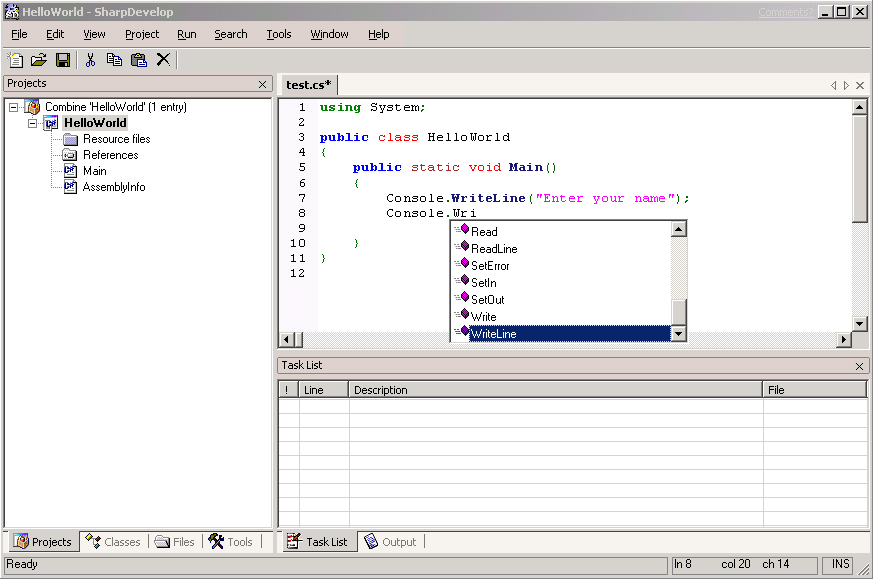 Windows developers were used to Visual
Studio, and Mike Krueger and the developers at Alpha Sierra
Papa had created the very
successful SharpDevelop
project, a .NET Windows.Forms-based application. At the
time, Mono did not have a working Windows.Forms implementation
(it would take another three years before our official 1.0
release of Windows.Forms) so this ruled.
Windows developers were used to Visual
Studio, and Mike Krueger and the developers at Alpha Sierra
Papa had created the very
successful SharpDevelop
project, a .NET Windows.Forms-based application. At the
time, Mono did not have a working Windows.Forms implementation
(it would take another three years before our official 1.0
release of Windows.Forms) so this ruled.
Although there had been an attempt to make SharpDevelop portable by Mike (with a variation on the theme of Eclipse's toolkit) this effort had not been completed, and SharpDevelop continued to be a Windows.Forms application.
Pedro Abelleira first extracted the editor and intellisense engine from SharpDevelop into a standalone component that rendered using Gtk# instead of Windows.Forms. This was back late in 2003. Initially it was only going to be a text editor.
Development started mostly on irc and quickly contributors started to porting various other pieces from SharpDevelop or rewriting the GUI components with Glade and Gtk#. By late 2003 Todd Berman had taken over the maintenance duties of MonoDevelop and sent me a email on December 31st:
Oh, and we are shooting for eating our own MonoDevelop dog food by the end of this coming weekend, and it looks like we will be there even before then.
History of the GUI Designers
As regular Gnome developers were were very happy using Glade and Gtk#'s [Widget] attributes to bind the XML GUI representation to our own variables. You double clicked on the .glade file, and Glade would launch from within MonoDevelop, you would tweak your UI, save it, and rerun from MonoDevelop.
Around this time Dan Winship from the desktop team started working on a new GUI designer for Gnome, the Stetic GUI designer. This was a Gtk#-based GUI designer, and the idea is that this could be embedded in other applications. An early screencast of Stetic capabilities is available here:

Stetic in March 2005.
Work continued, but Dan eventually moved on to other projects. By the end of 2005 we were looking at integrating a GUI designer directly into MonoDevelop and Stetic was not ready to do that, so instead Lluis integrated Glade-3 into MonoDevelop:

MonoDevelop with Glade-3, January 2006
This project did not live for too long. Glade-3 had to be patched, and we quickly realized that all the features that we wanted would require more than trivial changes to Glade-3. So we decided that instead of investing time in the C code base and the bridge to C#, that we would complete Stetic which was entirely written in C#, this is what it looks like today:

Stetic Designer inside MonoDevelop.
A complete screencast of Stetic and today's MonoDevelop integration shows all the work that Lluis and his team did to provide a smooth editing experience.
Today MonoDevelop not only supports forms design, but it also provides menu and toolbar editors and support for managing your icon collection in your application.

Menu editor
A key feature of .NET is the creation of reusable components. Lluis brought this to MonoDevelop and the stetic editor. This screencast shows how to create widget libraries with MonoDevelop and Stetic that you can later reuse in your projects or in other projects.
The Future
The team has already started work on the next release of MonoDevelop, version 1.1. Our goal is to release new versions of MonoDevelop every six months. To do this, we are planning on doing all of the disruptive changes on branches, and always keep our HEAD revision stable.
There are a number of incremental improvements on our task list, but also some exciting new features. There were many things that we could not get in time for 1.0 are being incorporated or implemented since the 1.0 tree branched a few months ago. Some of the new features that trunk users or alpha testers can get include:
New Managed Editor: The text editor is now entirely managed and has many new features like configurable keybindings (Really nice Emacs keybindings), split windows, Emacs/Firefox-like incremental search on a toolbar (no more annoying dialog box popping up in the middle of your source code) and one of the most requested features: region folding.
Moving to a fully managed widget written in C# gives us a lot of flexibility to improve the editor. This is a theme that was consistent in the 1.0 release, moving from Glade to Stetic and moving from the GdlDock to our own managed dock paid off every time in terms of developer agility and features that we could implement.
ASP.NET editor: new improvements will provide auto-complete and intellisense while editing .aspx files. Also, with the maturity of WebKit/Gtk we are hoping to replace Mozilla as the GUI editor for ASP.NET pages with this.
Integrated Debugging: Currently the Mono Debugger is only available as a command line tool. Our next release of MonoDevelop will provide debugging directly from the IDE.
Windows Port: There is now a Windows profile release of MonoDevelop. This will be great for developers that are building applications using Gtk# on Windows and want to get access to the Stetic GUI designer which currently requires them to use Linux to do this. It is not our intention to compete with SharpDevelop as an open source IDE for Windows Programmers although there might be some overlap.
msbuild-based model: We want to move to the Visual Studio build model to improve interoperability with Visual Studio, Blend and SharpDevelop and other tools that use msbuild files as their interoperability layer. This will allow developers to easily move across tools to work on different parts of a project.
XML Editor: A backport from SharpDevelop's XML editor has been integrated.
Future versions of MonoDevelop will extend on this feature set an integrate Ivan's Windows.Forms designer, Alan's Silverlight designer and improve Michael's ASP.NET designer.
Posted on 14 Mar 2008
Banshee Release
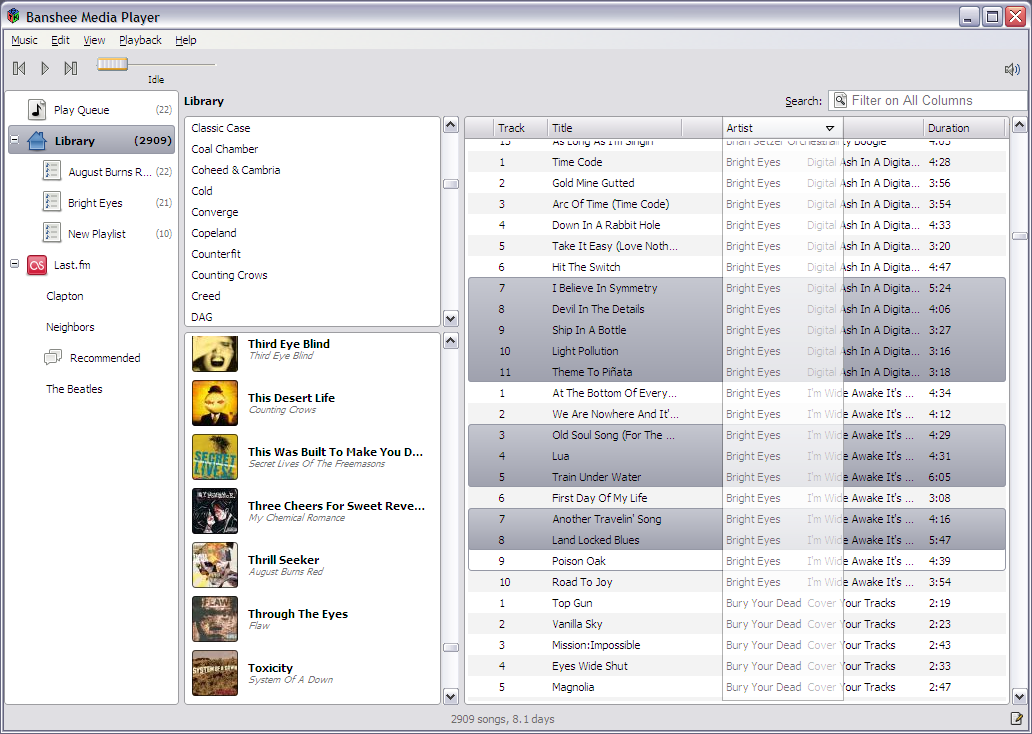
This is what Banshee looks like:
Banshee on Linux.
In other news, thanks to the work of Scott, Banshee will
soon be distributed for Windows as well:
Bringing open source media players to Windows.
Banshee uses Lluis'
Mono.Addins
framework to allow third party developers to extend banshee
with interesting new features.
 Yesterday Aaron released
the
Yesterday Aaron released
the 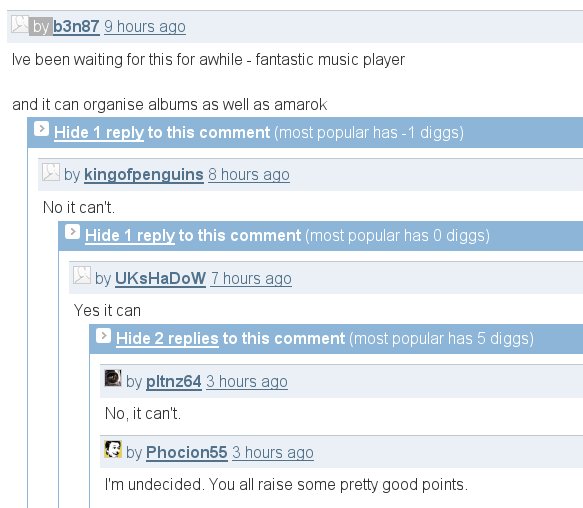

Posted on 14 Mar 2008
Mono on the iPhone, video
This video shows the Mono C# compiler building a sample native ObjC# application on the iPhone and then running the resulting executable on the iPhone.
Pay special attention to the beautiful error messages that our C# compiler generates.
This is using the ObjC# bindings that provide access to the Objective-C APIs from C#.
Discussion of the bindings and the Cocoa# APIs takes place in the cocoa-sharp and mono-osx mailing lists.
Update: better version, this one the typing with two hands and with some widgets on the screen and some events hooked up:
See Geoff's Norton for more details and also this one with comic included.
Of course, the iPhone is a locked platform, and chances of people being allowed to run Mono seem low.
The real question is when Android will be open enough that we can do a port of Mono to it (there is no C SDK at this point for Android).
Posted on 12 Mar 2008
Mix 08
Just got back from Mix 08 in Las Vegas. It was good to catch up again with old friends and make new friends. As usual, the event was a blast. To me the big interesting news were Silverlight 2.0 and the ASP.NET MVC release (details at Phil's blog).
Ray's keynote was light on the details, and too abstract for my taste.
The IE8 announcements were interesting. Their contributed test suite for CSS is good news, and came up with two nice new features: activities and webslices. Both ideas and their specifications were released under the OSP, and apparently by the end of the day there was a Mozilla plugin that implemented Activities. Hopefully we will get WebSlices on Linux as well.
Of course my personal favorite were the Silverlight 2 updates.
Since I attended mostly the hallway session, am using this weekend to catch up on the actual sessions. But I loved Joe Stegman's presentation on Silverlight 2 which Mike Harsh described as "we wanted to show code, not slides, lots of examples; you know, developer porn".

Sadly, I could not make it back to Part 2 with Mike, as the room was full and the bouncers were turning people away (and I also missed the repeat the next day).
Office Ribbon
If you love the software that you build, Jensen Harris' presentation on the History of the Office Ribbon is probably the most inspiring talk I have seen in years.

Every developer building GUI applications should listen to this presentation. This is as inspiring as Joel's articles on UI design were a few years ago when we were working on GNOME 2 or Andy's focus on empowering users were back on the Eazel days.
Silverlight 2
First things first. Catching up with Silverlight 2 is a great place to get demos, samples, tutorials, presentations and in-depth coverage of what is new in Silverlight 2.
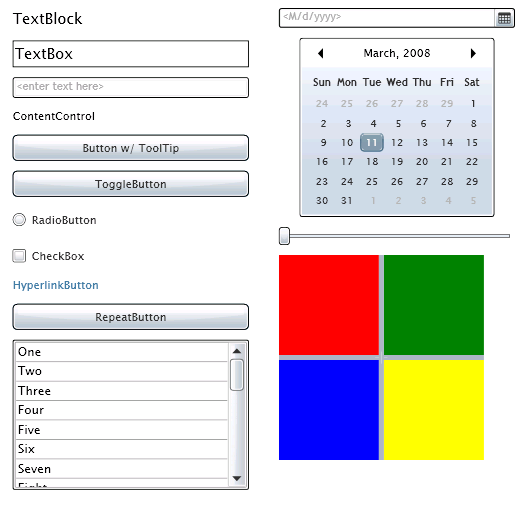 Silverlight 1.1 consisted of a .NET binding on top of the
core Silverlight 1.0 engine and the addition of the DLR and
DLR-based languages. This was never intended to be the last
word on it, and it was mostly a showcase of things to come.
Silverlight 1.1 consisted of a .NET binding on top of the
core Silverlight 1.0 engine and the addition of the DLR and
DLR-based languages. This was never intended to be the last
word on it, and it was mostly a showcase of things to come.
Silverlight 2 is the evolution of the 1.1 model in a number of directions.
The distribution model: Possibly the most interesting change is that there is now a "core" of Silverlight that will be available on every system and a model to bundle extra libraries for Silverlight. This keeps the Silverlight 2 download small, but most importantly it means that Silverlight 2.0 can ship without having to complete and freeze the APIs for every possible feature that people want.
The "extras" collection of controls are delivered in this way (like the databound controls) as well as things like the DLR. This means that you can use the DLR today, and still allow the DLR and Iron* teams to continue working and improving it without locking developers to an old version of the DLR that would have been deployed with every 2.0 installation.
Some other important changes:
- The application model is more consistent, and some of the common usage patterns for applications are directly handled by the new model (download all assets at once).
- A control framework. In 1.0 and 1.1, every developer had to create his own control framework, with 2.0 the control framework is in the core, and there is a nice collection of standard controls available (with text input!).
- Styles: The control framework also allows for skinning of controls through XAML snippets. For instance, consider a button, there a number of states that a button is rendered as: focused, unfocused, pressed, not-pressed. To transition from one to the other you can specify a XAML storyboard that will transition the button from any state to any other state. And you can also controls what is rendered, and how, independently of the control itself.
- Seadragon images. This is the support to quickly download images and implement infinite zooming. See this TED presentation for the details and a nice demo.
- Networking: support for socket connections (there are many restrictions here on what can be done) and support for allowing clients to issue HTTP requests to other web sites (this is similar to Flash policy files for the same feature).
- Updated DLR and Iron*.
Open source Silverlight Controls
At the keynote Scott announced that the high-level Silverlight controls were going to be open sourced, they will be released under the MS-PL.
There was apparently a miss-understanding and the controls were released inadvertently under a more restrictive license, but both Scott and Brian confirmed that they wanted us to use those controls.
This is brilliant, not only because it helps us, but for a load of useful reasons: it will let developers learn how to write controls early on the Silverlight 2 release process and will allow developers to fine-tune controls if they don't do exactly what they need.
This is important in particular for things like the DataGrid view, as there history has shown that there is no one-size-fits-all (regardless of how parameterized these controls are)
Moonlight
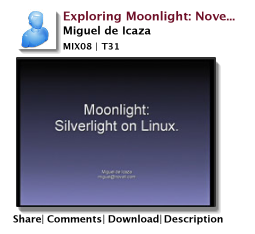 On Thursday I did a presentation on Moonlight. Due to the
general nervousness of this presentation I forgot to do a few
demos that I wanted to show. I wanted to
show Popfly and wanted to show
the Silverlight Journal (both 1.0-based applications).
On Thursday I did a presentation on Moonlight. Due to the
general nervousness of this presentation I forgot to do a few
demos that I wanted to show. I wanted to
show Popfly and wanted to show
the Silverlight Journal (both 1.0-based applications).
If you install Moonlight from SVN, you will be able to watch the presentation on Linux.
Sebastien is now working on the security aspects of Moonlight (auditing code, understanding the attack surface, trying to break our code). He posted an updated diagram of the trusted callers in the various Silverlight 2 assemblies.
Improving Mix
I personally would like to see "Meet the Experts" come back. Meet the Experts last year (and at the PDC) happens in the afternoon, as a last-session, there is food delivered and there are no other sessions scheduled, so its a good time for everyone to get together and quickly get some questions answered.
In my opinion, the bars and the party are no substitute for this session. Discussing styling of Silverlight controls on the bar goes more or less like this "WHAT ARE THE LIMITATIONS?", "NONE, YOU CAN CHANGE THE ENTIRE VISUAL TREE", "THE WHAT TREE?", "VISUAL", "WHAT?", "THE VISUAL TREE", "WHERE IS THE TREE?".
I still had a blast, but I would like to see "Meet the Experts" back on the agenda.
Posted on 11 Mar 2008
Mono on the iPhone
Luke Howard from PADL Software Ltd sent me some screenshots of Mono ported to the iPhone:
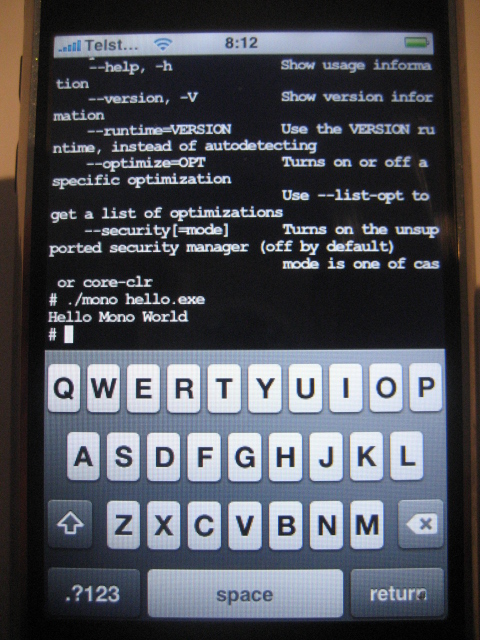
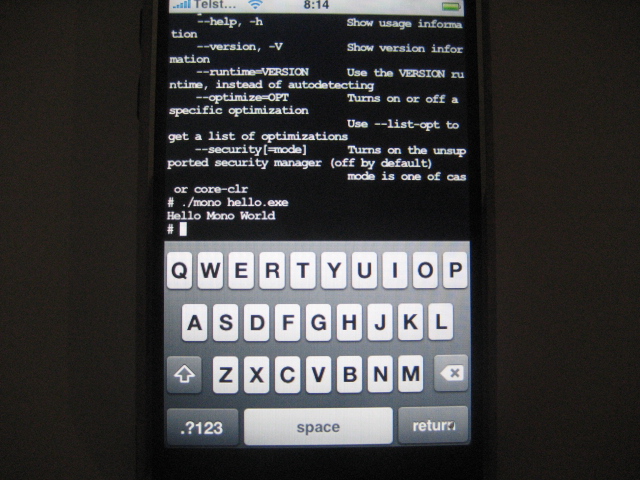
Some stats:
# hostinfo
Mach kernel version:
         Darwin Kernel Version 9.0.0d1: Wed Oct 10 00:07:50 PDT 2007;
root:xnu-933.0.0.204.obj~7/RELEASE_ARM_S5L8900XRB
Kernel configured for a single processor only.
1 processor is physically available.
1 processor is logically available.
Processor type: armv6 (arm v6)
Processor active: 0
Primary memory available: 116.00 megabytes
Default processor set: 26 tasks, 164 threads, 1 processors
Load average: 0.00, Mach factor: 0.98
# export MONO_DISABLE_SHM=1
# ./mono hello.exe
Hello Mono World
#
Posted on 10 Mar 2008
Channel9 works with Moonlight!
I just got back from Mix, updates my Moonlight from SVN and the videos at channel9 are now working with Mono.
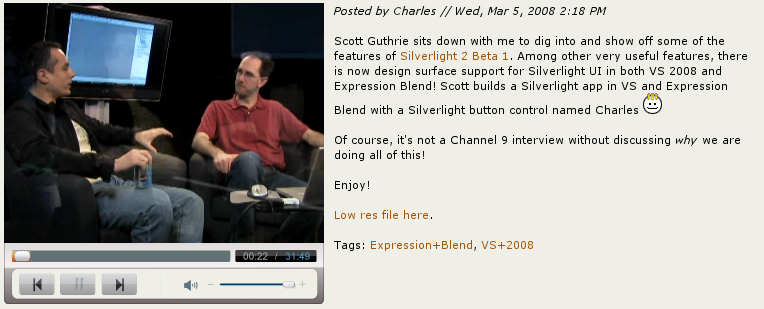
Inside Silverlight 2 Beta 1, an overview with Scott Guthrie
This is one of the important pieces of our media pipeline that was missing (support for the HTTP streaming protocol). The implementation is based on the work that Fernando and Rolf did using the recently released specifications that Microsoft published.
Sadly, I was not able to show that at Mix. Its also the first take, so more testing and exercising will be required.
Posted on 08 Mar 2008
Pre-Mix 08: Moonlight Updates
 We have been hard at work in Moonlight and I
keep postponing when to blog some updates about our work every
few days hoping to cram some new feature in the blog post.
We have been hard at work in Moonlight and I
keep postponing when to blog some updates about our work every
few days hoping to cram some new feature in the blog post.
And every few days turn into every few weeks and the next thing you know what should have been published a month ago ends up being my pre-Mix post.
Some of the most important changes in the last two months have been:
Moonlight Media Pipeline: So far we had been using ffmpeg's pipeline to process media. This means that ffmpeg was in charge of detecting the media formats, locating the codecs, demultiplexing the data, and decoding the data into video and audio frames.
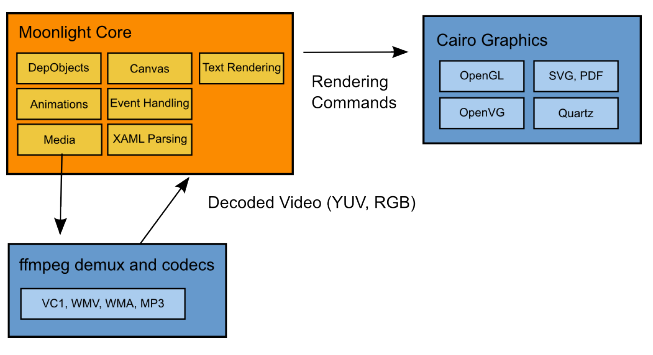
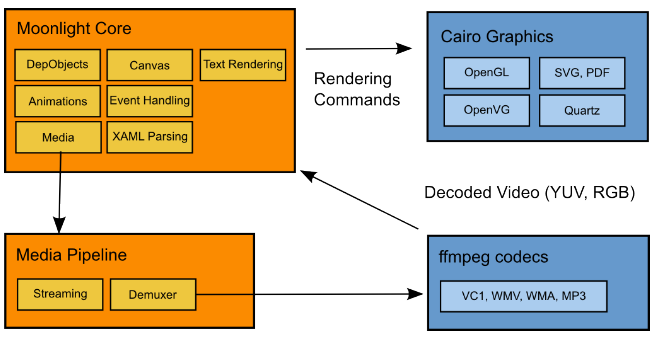
The ffmpeg pipeline was fine as a sample pipeline, but we needed a few more things. We needed more control over the pipeline to implement things like media streaming and supporting seek operations over HTTP; We want to be able to relicense the code under non-LGPL terms (for people that can not use the LGPL or some commercial uses) and we need to plug Microsoft's Media Pack media decoders.
Rolf rewrote our multimedia pipeline so that the code on SVN no longer depends on ffmpeg's pipeline and only uses ffmpeg's decoders for video and audio:
The end goal is to plug Microsoft's Media Pack (this contains the codecs video and audio) into Moonlight:
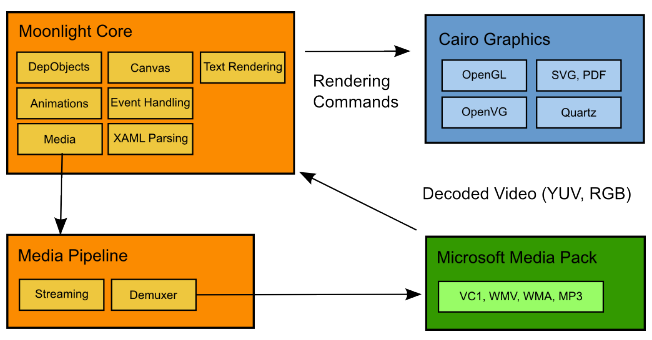
The installers that we currently distribute for Linux do not contain the ffmpeg media codecs. If you need to test media you will need to compile the code from source.
Streaming: With our new pipeline we are now able to stream media. In the past Moonlight downloaded the media file into the local file system, and only when the entire file was downloaded we would start the playback.
Moonlight can now start playback as soon as there is enough buffered data. This works for media that is only available over HTTP. Fernando has been working on the support for media that supports the MMS-over-HTTP (controlling seeking for example). Luckily, the specs for HTTP-based streaming to Windows Media servers were released last week (also the specs for the ASF container format, which should help validate our implementation).
Test Tools: As part of our collaboration with Microsoft we received various tools that are used to test Silverlight. We could not reuse the tools directly for Moonlight (too many Win32-isms, too hard to plug into Mozilla/Linux) so Jackson rewrote all of that code for Linux.
The test tools include plugins that expose Javascript APIs to control Silverlight and the browser, simulate user events and take snapshots of the screen. Microsoft has given us permission to open source our implementation of these tools.
This should help us in creating our own tests, and in checking our own code for regressions beyond the test suites that we will have received from them.
The code should hit SVN soon.
Mozilla Installers: We created some installers for Mozilla that should offer a one-click install experience for users on Linux.
Verifier: Rodrigo continues to work on Mono's CIL verifier and on strengthening the image loader, work that will not be used immediately for our Silverlight 1.0 support, but that will be important for 2.0 (when Mono is required).
Historically Mono had not been used to execute untrusted code as we mostly were a runtime for desktop and server applications and errors in the images fell directly in the "doctor it hurts when I do this" category.
But with Silverlight 2.0 the story changes, Mono will be executing potentially hostile code so this work is mandatory. Additionally, Sebastien has been improving Gendarme and his Monoxide tool to help in the audit process and we have created a security audit plan for the runtime. This work, like the verifier work is a work in progress.
In addition to using it for Silverlight, the verifier work will enable the SecondLife folks to allow the execution of binary code in their simulators instead of being limiting SecondLife to use LSL-based scripts.
Windowless Support: As it turns out Windowless rendering is used by many Silverlight applications. This is where Silverlight content seamlessly blends with the HTMl content. This is a must-have for things like Tafiti, the XamlPad, and the Vista simulator and nice-to-have for some other sites.
The good news is that Chris has implemented the support for it:

The bad news is that this is limited to Firefox 3.0, the 2.0 edition does not have support for Windowless rendering.
See Chris' blog entry for the details about the challenges and limitations of Moonlight/Windowless in Firefox/Linux.
Bug weeks: With the test suite running on Linux we have been focusing on passing all the Microsoft tests that we can and implementing the major features missing (like Windowless support).
Silverlight 2.0 Other than the JIT support for Silvelright 2.0 at this point we have not done any work on it (well there are 3 classes stubbed privately).
There are two reasons for this: the updated 2.0 API is not public and although we have access to it, it is a bit of a mess to try to keep two separate trees (public and private) to support this and since Mix is just around the corner, we will just wait until next week.
The second reason is that we want to focus on shipping 1.0, completing the media pack integration and working on the configuration aspects of Moonlight (auto-update configuration for instance).
Our Priorities
Everyone on the team has been working very hard to get all the pieces in place, and we are getting closer to completion. Every time we fix a bug, it has a nice ripple effect of fixing various other issues that we had seen in some sites at once.
Our priority currently is to ship Moonlight 1.0, and this means more or less:
- Integrate the Microsoft Media Pack.
- Complete our media pipeline.
- Fix all the bugs exposed by the test suites.
- Investigate some of the problems with some video card/driver configurations that seem to burn a lot of cycles.
- Improve the performance for heavily animated scenes.
Am excited about the Mix conference, looking forward to see the demos and what gets announced. And obviously very excited about my own session on Thursday to talk about Moonlight and Mono.
Time to go to sleep. Marek and myself are on a 7am flight and it will be hard to make it.
Posted on 03 Mar 2008
Blog Search
Archive
- 2024
Apr Jun - 2020
Mar Aug Sep - 2018
Jan Feb Apr May Dec - 2016
Jan Feb Jul Sep - 2014
Jan Apr May Jul Aug Sep Oct Nov Dec - 2012
Feb Mar Apr Aug Sep Oct Nov - 2010
Jan Feb Mar Apr May Jun Jul Aug Sep Oct Nov Dec - 2008
Jan Feb Mar Apr May Jun Jul Aug Sep Oct Nov Dec - 2006
Jan Feb Mar Apr May Jun Jul Aug Sep Oct Nov Dec - 2004
Jan Feb Mar Apr May Jun Jul Aug Sep Oct Nov Dec - 2002
Jan Feb Mar Apr May Jun Jul Aug Sep Oct Dec
- 2022
Apr - 2019
Mar Apr - 2017
Jan Nov Dec - 2015
Jan Jul Aug Sep Oct Dec - 2013
Feb Mar Apr Jun Aug Oct - 2011
Jan Feb Mar Apr May Jun Jul Aug Sep Oct Nov Dec - 2009
Jan Feb Mar Apr May Jun Jul Aug Sep Oct Nov Dec - 2007
Jan Feb Mar Apr May Jun Jul Aug Sep Oct Nov Dec - 2005
Jan Feb Mar Apr May Jun Jul Aug Sep Oct Nov Dec - 2003
Jan Feb Mar Apr Jun Jul Aug Sep Oct Nov Dec - 2001
Apr May Jun Jul Aug Sep Oct Nov Dec