Interactive C# Code Completion
Last month I introduced code completion in Mono's Interactive C# shell. You can use the TAB key to auto-complete at the current cursor position. Pressing the TAB key twice will list all possible completions.
This should make the csharp more pleasurable
to use and for bash junkies like me a more natural fit.
This is particularly useful to explore an API like Gtk#:
	csharp> LoadPackage ("gtk-sharp-2.0");
	csharp> using Gtk;
	csharp> Application.Init ();
	csharp> var w = new Window ("Hello");
	csharp> w.SetF[tab]
	SetFlag SetFocus SetFrameDimensions
	csharp> w.SetFo[tab]
	csharp> w.SetFocus ();
This comes in quite handy for completing namespaces, types and valid methods. It works with the C# 3.0 initializer syntax as well, that one is useful in Silverlight for those of us that can not stand to type XAML instead of C#:
csharp> new TextBlock () { Bac[tab]
Does the nice:
csharp> new TextBlock () { Background
Bonus points: another tab at that point inserts the equal sign to assign the value.
This was done by extending the Mono.CSharp.Evaluator API to provide code completion.
The API is fairly simple:
public static string [] GetCompletions (string input, out string prefix)
This will provide possible completions (methods, properties, fields) that are valid at that point in the string.
A discussion that details the implementation of how the compiler supports code completion is in the mailing list and our compiler documentation has been updated to include a tutorial on expanding code completion.
The next step is to implement this for the interactive GUI shell.
Posted on 28 Apr 2009
Gtk# 2.12.8 Installer for Windows
Mike Kestner yesterday announced the availability of the new Gtk# installer for Windows.
A few good news: the entire stack (Gtk+, Cairo and Gtk#) comes in a nice 8 meg download, it is packaged as an MSI and it is now signed by Novell's certificate, so you no longer get a scary "Unknown Publisher" dingus on the screen.
This is the equivalent of the greek god Prometheus giving fire to humans.
We are giving Windows developers a nice cross-platform toolkit that is nicely integrated into Visual Studio. To try a sample application using it, you can download Tomboy, load the Tomboy.sln solution, hit F5 and enjoy.
Posted on 22 Apr 2009
PseudoTerminal class
As a follow up to yesterday's post I did the "hard work" of cut-and-pasting the VTE pseudo-terminal support+gnome-pty-helper into an independent module and wrote a managed binding for the code, autoconf-ified it and put it on SVN.
Code lives in the pty-sharp module, or you can get a tarball.
Now someone needs to do the trivial hack of writing the Mono terminal emulator.
Posted on 21 Apr 2009
Pseudo Terminals and Terminal Emulators
There was a discussion about how to host REPLs in applications like MonoDevelop recently and some of the discussion was centered around how to host something like a shell into a program like MD.
Since I have been thinking about building a Silverlight-based version of the Midnight Commander (OH NOES!) I figured I should share some thoughts that I had on this matter.
Widgets like ZVT and VTE today bundle a number of things in a single widget:
- A Unix Pseudo terminal with login/logout support (Unix flavor-specific).
- A terminal emulator that turns escape sequences generated by a stream into rendering commands.
- A binding to the Gtk+ toolkit to send input events to the child process and render the terminal results.
I would like to see some nice C# libraries for doing each one of those tasks independently of each other. Think of it as the MVC of terminal widgets. Like this:

Reusable Blocks for Terminal Emulation.
Pseudo-terminal support: the functionality to create pseudo terminals is very OS-specific, it is hard to get right and getting the more advanced features like registering your session is even harder. Very few applications get this right (mc, zvt and vte all use the same code that took me years to fine tune but has never been made reusable for other applications).
This can be used beyond terminal emulators, it can be used to script or control programs expect a real terminal to run. These are typically interactive Unix console applications.
Those applications either break or refuse to run when their standard input or standard output are redirected. Expect is a system built on top of this functionality
Terminal Emulation: A terminal emulator class that supports the vt100/xterm command set and render it into some internal buffer; can take high-level keystrokes and encode them as byte streams (for example turning Alt-X into ESC-x) and supports terminal resizing.
This terminal emulator should not be bound to Gtk+ it should merely render into a text buffer.
Gtk#, Silverlight and Curses Bindings: Once the underlying terminal emulator exists we will need to write a handful of bindings to the terminal emulator.
The Gtk# is an obvious choice for embedding terminal emulators inside things like MonoDevelop.
The Silverlight binding would allow people to create full fledged SSH clients on the web.
The curses binding could be used to implement an application like GNU Screen or it could be used in an application like the Midnight Commander (the Midnight Commander plays some Unix tricks to avoid having to emulate a terminal, and this has been a small weakness).
Posted on 20 Apr 2009
Banshee and Tomboy over the weekend
 Over the weekend a couple of interesting post were made:
In "Fitting the Kitchen Sink into a CD" Jo from the the Debian/Ubuntu Mono developers and describes how the way they have split Mono on Debian/Ubuntu makes it so that replacing Rhytmbox with Banshee Media Player ends up consuming less space on Ubuntu's LiveCD (6 megs) and brings more features.
Nice to see that using managed code consumes less space and delivers more features. There is a heated debate on the comments as well.
Sandy Armstrong also posted an update on the desktop note-taking application Tomboy that now runs on Windows and MacOS X.
Sandy was just saying a few weeks ago that porting Tomboy to Windows brought new developers to the project. Although some people have historically been against the idea of making Linux software available on other platforms, it is nice to see day-to-day validation that by expanding the scope of our open source software to other platforms it directly improves the software in our own platform (as many predicted).
Posted on 20 Apr 2009
Common Compiler Infrastructure and Cecil.
Last week at Lang.NET 2009 conference the Common Compiler Infrastructure was open sourced under the terms of the MS-PL license.
This library was developed used internally at Microsoft some years ago to support some internal projects. This provides a set of services similar to our own Cecil library. Despite this, it is nice to see Microsoft open source more code.
Cecil, in addition to the low-level APIs for reading and writing ECMA CIL files has a few niceties layered on top of it like a Flowanalysis engine (it is used to decompile byte codes into ASTs) and a full fledged decompiler.
Additionally, Marek is currently replacing the backend in
our C# compiler to move away
from System.Reflection.Emit into using Cecil so
that we can bring our C# REPL to Windows developers.
Mono's C# REPL currently works in a very limited mode in
.NET (no generics, no LINQ) because
.NET's System.Reflection has several limitations
for building full-fleged compilers. To work around this issue
Mono has over the years extended the Reflection stack to
provide the features that were missing. We were never quite
happy with this and we are now dropping it in exchange for
Cecil.
JB, the creator of Cecil shares with us his take on Cecil and the CCI.
Posted on 20 Apr 2009
Job Posting: Mono Hacker Looking for a Job
A good friend of mine that has extensive experience with C# and has written significant portions of the Banshee media player, has contributed to our C# 3.0 and C# 4.0 support and to our runtime is looking for a programming job.
If you want to hire him, drop me an email and I will get you in touch with him.
Posted on 10 Apr 2009
Continuations in Mono: Embrace and Extending.NET, Part 3
Update: I accidentally published an incomplete version of this blog entry the other day before the actual content and samples were ready.
As part of our ongoing Embrace and Extend.NET series (SIMD, supercomputing), today I wanted to talk about the Mono.Tasklets library that has just landed on Mono's repository.
This library will become part of the Mono 2.6 release.
Mono.Tasklets is the Mono-team supported mechanism for doing continuations, microthreading and coroutines in the ISO CLI. It is based on Tomi Valkeinen's excellent work on co-routines for Mono.
Unlike the work that we typically do in Mono which is pure C# and will work out of the box in .NET (even our Mono.SIMD code will work on .NET, it will just run a lot slower) Mono.Tasklets requires changes to the VM that are not portable to other ISO CLI implementations.
History
Unity Early Experiments
Back in 2004 when Unity first started to explore Mono, Joachim Ante brought up the topic of coroutines in Mono. On an email posted to the mono-devel-list he stated:
I want to be able to write scripts like this:void Update () { Console.WriteLine ("Starting up"); //Yields for 20 seconds, then continues WaitFor (20.F); Console.WriteLine ("20 seconds later"); }The WaitFor function would yield back to unmanaged code. The unmanaged code would then simply go on, possibly calling other C# methods in the same class/instance. After 20 seconds, the engine would resume the Update method.
The idea here is to have multiple execution paths running on a single thread using a sort of cooperative multitasking. GUI programmers are already used to this sort of work by using callbacks: event callbacks, timer callbacks and idle callbacks. In Gnome using C or C# 1.0 you use something like:
	void do_work ()
	{
		printf ("Starting up\n");
		g_timeout_add (20 * msec, do_work_2, NULL);
	}

	void do_work_2 ()
	{
		printf ("20 seconds later\n");
	}
Although lambdas help a little bit in C# 2.0 if the core of your application needs to chain many of these operations the style becomes annoying:
	DoWork ()
	{
		Console.WriteLine ("starting up");
		Timeout.Add (20 * msesc, delegate {
			Console.WriteLine ("20 seconds later");
		});
	}
In event-based programming everything becomes a callback that is invoked by the main loop. The developer registers functions to be called back later in response to a timeout or an event.
Another alternative is to build a state machine into the callbacks to put all of the code in a single method. The resulting code looks like this:
	void do_work (void *state)
	{
		MyState *ms = (MyState *) state;

		switch (ms->state){
		case 0:
			printf ("starting up\n");
			ms->state = 1;
			g_timeout_add (20 * msec, do_work, state);
			break;
		case 1:
			printf ("20 seconds later");
		}
	}
It is worth pointing out that Joachim and in general the gaming world were ahead of our time when they requested these features. This style of threading is commonly referred as microthreading or coroutines.
At the time, without runtime support, Rodrigo suggested that a framework based on a compiler-supported generator-based system using the yield instruction would satisfy Joe's needs for coroutines in the gaming space.
This is what Unity uses to this day.
C# Yield Statement in Mono
The yield statement in C# works by building a state machine into your method. When you write code like this:
	IEnumerable DoWork ()
	{
		Console.WriteLine ("Starting up");
		yield return new WaitFor (20 * msec);
		Console.WriteLine ("After resuming execution");
	}
The compiler generates a state machine for you. In the above example there are two states: the initial state that starts execution at the beginning of the function and the second state that resumes execution after the yield statement.
A year later we used a variation of the above by employing nested yield statements in C# to implement Mono's HttpRuntime pipeline stack.
Cute screenshot from my blog at the time:
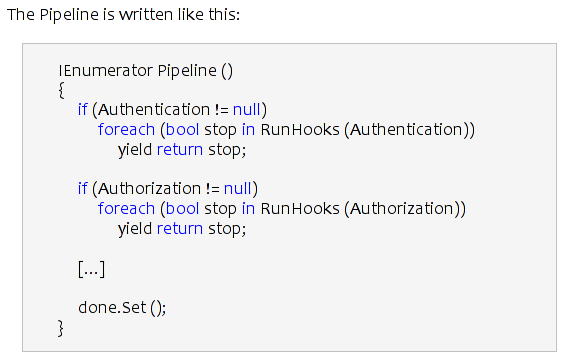
Yield statements can be used to solve this class of problems, but they become annoying to use when every method participating in suspending execution needs to become an iterator. If any part of the pipeline is not built with explicit support for yield, the system stops working. Consider this:
void Attack()
{
	 DoTenThings ();
}

void DoTenThings()
{
	  for (int i=0; i < 10; i++){
	      C();
	  }
}

IEnumerable C()
{
	   yield WaitForIncomingMessageFromNetwork();
}
Here, even if the WaitForIncomingMessageFromNetwork uses yield the callers (DoTenThings and Attack) are not participating, they merely discard the return from yield, so the execution does not return to the main loop.
Using a yield-based framework is not much of a problem if you only need to use this every once in a while. For example we use this in our ASP.NET engine but it is only used in a handful of places.
Unity used an approach built on top of the yield framework to suspend and resume execution. For example this is invoked by the Update() function on an enemy script:
function Patrol() {
	while(true) {
		if (LowHealth ())
			RunAway();
		else if (EnemyNear ())
			Attack();
		else
			MoveSomewhere();
		yield; // done for this update loop!
	}
}

function Attack () {
	while (!LowHealth () && EnemyNear ()) {
		DoTheAttack ();
		// done with this update, and wait a bit
		yield WaitForSeconds (attackRate);
	}
	// return to whatever invoked us
}
The same can be done in Unity with C#, but your functions should be declared as returning an IEnumerable.
Microthreading in SecondLife
In 2006, Jim from LindenLabs introduced the work that they had done in SecondLife to support microthreading.
Jim's work was a lot more ambitious than what both Joe had requested. SecondLife required that code be suspended at any point in time and that its entire state be serializable into a format suitable for storage into a database. Serialized state could then be restored at a different point in time or on a different computer (for example while moving from node to node).
For this to work, they needed a system that would track precisely the entire call stack chain, local variables and parameters as well as being able to suspend the code at any point.
Jim did this by using a CIL rewriting engine that injected the state serialization and reincarnation into an existing CIL instructions stream. He covered the technology in detail in his Lang.NET talk in 2006.
The technology went in production in 2008 and today this continuation framework powers 10 million Mono scripts on SecondLife.
Tomi's Microthreading Library
That same year Tomi posted a prototype of coroutines for Mono called MonoCo, inspired by the use of Stackless Python for EVE Online.
The Stackless Python on EVE presentation goes through the concepts that Tomi adopted for his Mono.Microthread library.
Tomi's approach was to modify the Mono runtime to support a basic construct called a Continuation. The continuation is able to capture the current stack contents (call stack, local variables and paramters) and later restore this state.
This extension to the runtime allowed athe entire range of operations described in the Stackless Python on Eve presentation to be implemented. It also addresses the needs of developers like Joachim, but is not able to support the SecondLife scenarios.
Mono.Tasklet.Continuation
The Mono.Tasklet.Continuation is based on Tomi's Microthreading library, but it only provides the core primitive: the continuation. None of the high-level features from Tomi's library are included.
This is the API:
	public class Continuation {
		public Continuation ();
		public void Mark ();
		public int Store (int state);
		public void Restore (int state);
	}
When you call Store the current state of execution is recorded and it is possible to go back to this state by invoking Restore. The caller to Store tells whether it is the initial store or a restore point based on the result from Store:
	var c = new Continuation ();
	...

	switch (c.Store (0)){
	case 0:
		// First invocation
	case 1:
		// Restored from the point ahead.
	}
	...
	// Jump back to the switch statement.
	c.Restore (1);
Tomi implemented a Microthreading library on top of this abstraction. I ported Tomi's Microthreading library to Mono.Tasklet framework to test things out and I am happy to report that it works very nicely.
Tomi's patch and library were adopted by various people, in particular in the gaming space and we have heard from many people that they were happy with it. Not only they were happy with it but also Paolo, Mono's VM curator, liked the approach.
Frameworks
Speaking with Lucas, one of the advocates of Tomi's VM extensions, at the Unite conference it became clear that although the Mono.Microthreads work from Tomi was very useful, it was designed with the EVE scenario in mind.
Lucas was actually not using Mono.Tasklets on the client code but on the server side. And when used in his game the Stackless-like primitives were getting on his way. So he used the basic Continuation framework to create a model that suited his game. He uses this on his server-side software to have his server micro-threads wait for network events from multiple players. The Tomi framework was getting in Lucas' way so he created a framework on top of the Continuations framework that suited his needs. He says:
I found however, that what system you build on top of the core continuations tech, really depends on what kind of application you're building. For instance, I have a system where I send serialized "class ProtocolMessage" 's over the network. they have a questionID and an answerID, which are guids.in my code I can say:
	// automatically gets questionID guid set.
	var msg = new RequestLevelDescriptionMessage();
	someConnection.SendMessageAndWaitForAnswer (msg);
the last call will block, and return once a message with the expected type, and matching answerID has been received. This is made to work because the SendMessageAndWaitForAnswer<T>() call adds itself to a dictionary<GUID,MicroThread> that keeps track of what microthreads are waiting for which answer. A separate microthread reads messages of the socket, and reads their answerID. it then looks to see if we have any "microthreads in the fridge" that are waiting for this message, by comparing the guid of the message, to the guid that the microthread said it was waiting for. If this is it, it reschedules the microthreads, and provides the message as the return type for when the microthread wakes up.
This is very specific to my use case, others will have things specific to their use cases.
Going back to the Joachim sample from 2004, using Tomi's code ported to Mono.Tasklets, the code then becomes:
	void Update ()
	{
	    Console.WriteLine ("Starting up");
	    //Yields for 20 seconds, then continues
	    Microthread.WaitFor (20.F);
	    Console.WriteLine ("20 seconds later");
	}
The MicroThread.WaitFor will suspend execution, save the current stack state --which could be arbitrarily nested-- and transfer control to the scheduler which will pick something else to do, run some other routine or sleep until some event happens. Then, when the scheduler is ready to restart this routine, it will restore the execution just after the WaitFor call.
A sample from the game world could go like this:
	prince.WaitForObjectVisible (princess);
	prince.WalkTo (princess);
	prince.Kiss (princess);
The code is written in a linear style, not in a callback or state machine style. Each one of those methods WaitForObjectVisible, WalkTo and Kiss might take an arbitrary amount of time to execute. For example the prince character might not kick into gear until the princess is visible and that can take forever. In the meantime, other parts of the game will continue execution on the same thread.
The Continuation framework will allow folks to try out different models. From the Microthread/coroutine approach from Tomi, to Lucas' setup to other systems that we have not envisioned.
Hopefully we will see different scheduling systems for different workloads and we will see libraries that work well with this style of programming, from socket libraries to web libraries to file IO libraries. This is one of the features that Lucas would like to see: Networking, File and other IO classes that take advantage of a Microthreading platform in Mono.
Posted on 09 Apr 2009
Boston .NET Users Group Presentation
Today both Joseph and myself are doing a presentation on Mono, Moonlight at the Boston .NET Users Group meeting in Waltham.
We will be demoing the Visual Studio integration and remote debugging capabilities of Mono as well as SuseStudio to go from an ASP.NET application into an appliance with a handful of clicks.
Posted on 08 Apr 2009
Update
The actual post on Mono continuations and coroutines is available here.
Posted on 07 Apr 2009
Monday Mystery: Poetry Showing up on my Surveys.
Yesterday I was pondering whether I should go to Lang.NET 2009 and unable to make a decision, I ran an online poll and asked people to vote on twitter:

In my survey I listed the pros and cons to give people a feeling of what I was up against.
The first couple of votes were not very helpful, I got 2 votes, one said yes, one said no.
Then another twenty or so votes came and the balance started to shift towards "go". Here is the final result:
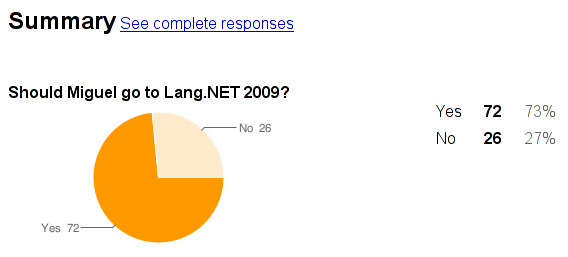
And then something very strange happened, the comment section for the online poll started getting people's opinion in the form of poems or Haikus.
I copy pasted some of the poems below:
In my heart you will always be now in heaven i cant wait again to see
When I decided not to roam
I just stayed home
Got a lot done
Enjoyed some time in the sun
Listen to good talks with your friends
Before all the fun ends!
Catch up and learn about Google's V8
--Maybe you'll even get a date!
You should go because it will be a blast
Life is short, so make it last!
a haiku for miguel:
Improve your cv
Boston is lovely right now
Drink with nerdy folks
I can’t make up my mind.
I really am in a bind.
I can go to Lang dot net,
And my day will be set.
Or stay at home and work,
Like a common store clerk.
This choice will be easy.
Lang is where I will be.
Should I stay,
or should I go?
For every con,
there is a pro.
I could see old friends,
and make some new.
Or stay at home,
and get work done too.
I could learn about Second Life,
and Google's V-8.
And actually accruing miles
would really be great.
It would take a whole week.
And delay my work,
But learning something new
Is definitely a perk.
A programmer I am,
and a programmer I will be.
I think this great poem
made my mind up for me.
New friends
Old friends
Learning new things
And when you get back to Boston
You can have some baked beans
destroyer of days seven
bringer of travel expenses
Lang.NET
provider of lectures
connector of colleagues
Lang.NET
delayer of projects
impeder of family time
Lang.NET
programmer of dynamic C#
granter of Second Life
Lang.NET
Why go across the country to have a v8?
Because that's what .NET is 4.
Lang.NET
Kill time
or make new friends?
Lose a little time from work
or catch up with those you've fallen out of touch with?
Work can always wait Miguel
opportunity cannnot.
Another dollar for yet another day,
That is what they all used to say.
For Lang.NET 2009 I pine away
The cost to do it makes me say “Hey!”
Give me Second Life with which to play
If only I could go to the conference that way
I’d program it if C was their programming thang’
Let me help Miguel on what to do.
He's undecided...can't decide between the two.
If he goes to Lang. NET, work at home will pile high.
If he stays home to work, perhaps he'd cry.
He'd miss the chance to learn Second Life,
Or make new friends, maybe even find a wife!
So it costs a few bucks to get to there.
He'd blow it on something else other than air fare!
Make the reservations today and don't delay.
You'll have a good time....that's what I say!
Divided I stand
The opportunity to advance ahead
A week of talks and new friends await me
On my way to Lang.NET 2009.
One week gone,
Trekking across the country.
Putting all tasks aside,
I delay work
On my way to Lang.NET 2009.
In the end,
The journey made
Is better than the journey dreamed.
Oh the choice, to go or to stay
that is Miguel's question of the day!
Should he go, he would have a great time
Should he stay...he might save a dime!
Going he will learn about new things out there
Staying he might...get more work done fair.
The choice looks easy to someone like me
but then again I'm not Miguel....I'm Susie
Once when Miguel was feeling weak,
A conference looked to kill his week.
But opportunity there it seemed was rife:
A chance to master Second Life!
Miguel's Dilemma
Should I stay or should I go
The trip could be for not
But my gut says I should go
Money,work,time and home
Oh, well bye bye I go.....
knowledge is calling me to fill him up
my friends are quite expecting
there are also some guys I don't know that i have to spy on
who cares about work!
who cares if I hitchhike to Lang.Net!
home will always wait
across the country I will enlighten myself
To Lang.NET or not to Lang.NET ... that is the question.
Whether 'tis nobler to learn about great stuff
Like Second Life and dynamic C#,
Or consider it the death of
An entire week away from home,
Thereby missing out on the catching up with old friends.
What value, then, shall be given
This knowledge and friendship?
Is it greater than the cost of transport and per diem?
Only Miguel can truly tell.
Lang.NET
Lang.NET
Oh this decision should not make you fret
Think about the things that are great
Second Life! .NET 4 and Google V8!
These things are worth the week away
your delay in work, and your hit in pay
Think about the old friends you'll greet
And all the new ones that you will meet
The knowledge base you'll gain and learn
will help you back help you back home and what you earn
Lang.NET
Lang.NET
Looks like going is really your best bet.
Haiku:
While traveling sucks
Experience should be worthwhile
Go enjoy Lang.NET
There are times we can't resist
Pondering the things we've missed.
We vow, "Next time I won't be slow.
I'll just pick up myself and go.".
And when we're back, our money spent,
We often think, "I'm glad I went".
Lang.Net
Not a bad gig to get
Sure it's a road trip
And a work skip
A budget breaker
But 'cmon,
Ain't it grand to be a taker?
Lang.Net
Not a bad gig to get
Sure it's a road trip
And a work skip
A budget breaker
But 'cmon,
Ain't it grand to be a taker?
Miguel should fly cross country,
And not worry about the money.
The trip will be great,
You must learn about Google V8.
Leaving home for a week,
Does sound rather bleak,
But you'll chat with old pals,
And may meet some gals.
There is much to learn,
but conferences return.
If you stick to your guns,
keep your money in your pocket,
you'll have more in store
when next year rolls around.
So stand on solid ground!,
and in 2010 launch rocket.
Not quite sure why I got so many replies in the form of poems, and Google surveys do not track the IP address of the submissions, so I have no idea if these were all submitted by the same person or not.
Need to get to the bottom of this mystery.
Posted on 06 Apr 2009
Supercomputing Mono
 Last year we did some work in Mono together with
Luis Ortiz to support 64-bit arrays in the VM.
Last year we did some work in Mono together with
Luis Ortiz to support 64-bit arrays in the VM.
What was interesting about this work is that even though the ECMA standard allows the index of arrays to be a long .NET on Windows64 does not support this and Java would require modifications to the bytecode format. Altering Mono became the natural choice for those looking to host very large arrays in an advanced and managed VM.
 This means that you can continue to use your existing tools
to build applications, but when running under Mono you will
get to use those arrays without that pesky 2,147,483,648 upper
boundary.
This means that you can continue to use your existing tools
to build applications, but when running under Mono you will
get to use those arrays without that pesky 2,147,483,648 upper
boundary.
Today Ian Dichkovsky (from N-iX)announced on the mailing list their work to bring Mono to the MIPS64 from SiCortex. This is based on the excellent work from Mark Mason that did the MIPS32 port.
SiCortex has an entry-level desktop computer with 72 MIPS processors and if you have the budget you can get modules with 5,832 processors. The MIPS processors helps them stay eco-friendly.
Posted on 06 Apr 2009
Telerik Announces Support for their ASP.NET controls on Mono!
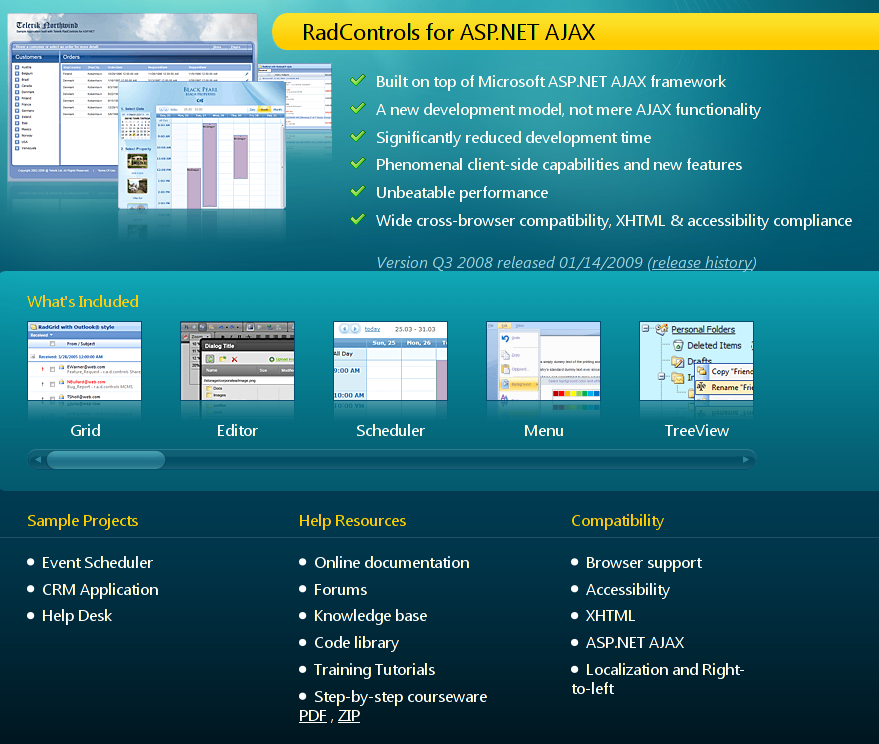
Telerik is one of the most famous provider of controls for .NET. We have been working for the past few months with Telerik to make sure that their RadControls for ASP.NET AJAX product worked out of the box with Mono:
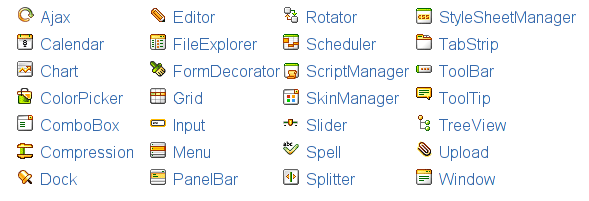
Today Telerik announced the availability of their product officially for Mono-based customers on Linux systems. From their press release:
Telerik, the leading vendor of development tools and components for the Microsoft .NET platform announced that RadControls for ASP.NET AJAX fully supports the Mono runtime environment, an open source .NET framework sponsored by Novell, tailored for development of Linux applications. The Telerik AJAX UI components is the first major commercial user interface (UI) suite to go cross-platform and allows developers to build rich .NET applications in a Linux environment. “This has been a long-awaited feature, which we have been quietly working on for quite some time. Over the past few months, we have been actively testing the compatibility of our RadControls for ASP.NET AJAX offering with Mono", said Hristo Kosev, Telerik CTO. "We are extremely happy that our joint work with Novell will allow customers to build compelling high-performance ASP.NET AJAX-based applications and run them on Linux using Mono 2.4.” The decision to work with Novell to extend the capabilities of RadControls over other platforms is in direct response to customer feedback and interest in Mono. Telerik and Novell are optimistic about the effect their partnership will have on the industry and the benefits it will bring to .NET developers.
Telerik is a major player in the control space in the .NET world and many developers turn to them for ready to use controls for their applications. Developers that were previously using Telerik products can now host their products on Linux servers.
Special thanks go to Marek Habersack in the Mono team who worked tirelessly to fix Mono's ASP.NET stack. Working with the Telerik folks was a pleasure. Telerik helped us by providing us access to their source code, their test suite and their QA team that made sure that their thousands of tests ran equally well on Mono as they did on Microsoft's .NET.
You can try the Telerik controls running on Mono at http://mono.telerik.com/.
Posted on 03 Apr 2009
MonoDevelop Support for ASP.NET MVC
Michael Hutchinson blogs about how to use the recently open sourced ASP.NET MVC framework with MonoDevelop. Go from installing MonoDevelop 2.0 to your first ASP.NET MVC application 3 minutes:

There are a few very simple steps:
- Go to Tools/Add-in Manager.
- Click "Install Add-ins".
- In ASP.NET select "ASP.NET MVC".
- Install.
- Select File/New Solution
- Select ASP.NET MVC project.
- Hit F5 (run) to run your first app:
This will give you basic templates and dialog boxes for solutions, views, controllers and master pages. The code uses Michael's recent implementation of the T4 engine.
Check Michael's Blog for a complete step-by-step setup.
The Add-in bundles Microsoft's recently open sourced ASP.NET MVC engine to run on top of Mono 2.4.
Kudos to Michael that created this add-in in his copious spare time. And kudos to the MonoDevelop team that created such a pleasant platform to extend.
Posted on 02 Apr 2009
Microsoft releases ASP.NET MVC under the MS-PL License
Microsoft's ASP.NET MVC is an extension built on the core of ASP.NET that brings some of the popular practices and ease of development that were popularized by Ruby on Rails and Django to the .NET developers.
Scott Guthrie ---the inventor of ASP.NET--- just announced that Microsoft is open sourcing the ASP.NET MVC stack under the MS-PL license:
I’m excited today to announce that we are also releasing the ASP.NET MVC source code under the Microsoft Public License (MS-PL). MS-PL is an OSI-approved open source license. The MS-PL contains no platform restrictions and provides broad rights to modify and redistribute the source code. You can read the text of the MS-PL at: http://www.opensource.org/licenses/ms-pl.html
These are incredibly good news. Worth dancing for!
I know that a lot of developers inside Microsoft worked to get this important piece of code released under the MS-PL to ensure that the users of ASP.NET could benefit from the code being open source. I know that at least Phil Haack, Scott Guthrie, Scott Hanselman, Dimitry Robsman, Rob Conery and Brian Goldfarb pushed for this.

I am psyched, not only because ASP.NET MVC is usable in Mono and the code is licensed under open source terms, but also because I strongly believe that the same innovation, rapid adoption and experimentation that has happened with the new wave of web stacks will come to ASP.NET MVC across all platforms.
The source code is available for download and we are hoping to integrate this into Mono shortly. Scott Hanselman has a nice blog entry on how ASP.NET MVC went from price-free to open-source free.
In Scott's PDF tutorial he discussed how to build applications with ASP.NET MVC using Visual Studio and how the Rails practices of not repeating yourself and convention over configuration are used by ASP.NET MVC.

We have developed a MonoDevelop add-in that provides a set of templates, dialog boxes and the tooling necessary to take advantage of ASP.NET MVC on Linux and MacOS X as well. Hopefully the experience will be very similar to Visual Studio.
It was only two weeks ago that we were sipping virgin pina coladas at Mix09:

Posted on 02 Apr 2009
Blog Search
Archive
- 2024
Apr Jun - 2020
Mar Aug Sep - 2018
Jan Feb Apr May Dec - 2016
Jan Feb Jul Sep - 2014
Jan Apr May Jul Aug Sep Oct Nov Dec - 2012
Feb Mar Apr Aug Sep Oct Nov - 2010
Jan Feb Mar Apr May Jun Jul Aug Sep Oct Nov Dec - 2008
Jan Feb Mar Apr May Jun Jul Aug Sep Oct Nov Dec - 2006
Jan Feb Mar Apr May Jun Jul Aug Sep Oct Nov Dec - 2004
Jan Feb Mar Apr May Jun Jul Aug Sep Oct Nov Dec - 2002
Jan Feb Mar Apr May Jun Jul Aug Sep Oct Dec
- 2022
Apr - 2019
Mar Apr - 2017
Jan Nov Dec - 2015
Jan Jul Aug Sep Oct Dec - 2013
Feb Mar Apr Jun Aug Oct - 2011
Jan Feb Mar Apr May Jun Jul Aug Sep Oct Nov Dec - 2009
Jan Feb Mar Apr May Jun Jul Aug Sep Oct Nov Dec - 2007
Jan Feb Mar Apr May Jun Jul Aug Sep Oct Nov Dec - 2005
Jan Feb Mar Apr May Jun Jul Aug Sep Oct Nov Dec - 2003
Jan Feb Mar Apr Jun Jul Aug Sep Oct Nov Dec - 2001
Apr May Jun Jul Aug Sep Oct Nov Dec