Mono in Barcelona
Jordi Mas has organized for me to talk in Barcelona on November 8th at 19:30 in the Aula Magna at the Universitat de Barcelona at Gran Via de les Corts Catalanes, 585.
Will talk about Mono, developing with Mono, will likely introduce the work from Jordi (Workflow) and Lluis (MonoDevelop and Stetic) and talk about our plans for Mono 2.0 and beyond.
 At the Microsoft TechEd
Frank Rego and myself will be at TechEd Developers in Barcelona from the 7th to the 10th. If you are attending TechEd, we will be in the Novell booth.
Posted on 31 Oct 2006
F-Spot's Prepare Email
F-Spot finally has a feature that I have been waiting for. It is now possible to scale pictures before sending them:
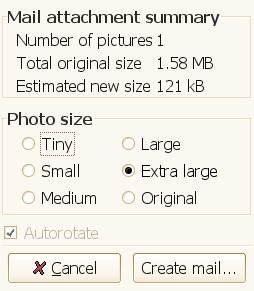
Preparing Images for Email
Posted on 31 Oct 2006
MonoTorrent Updates
Alan McGovern the developer of the BitSharp libraries (Bittorrent APIs for the CLI) started blogging.
Alan has continued his work from the Summer of Code, here are a few updates from him:
- On some challenges he is facing.
- Performance improvements: downloads went from 30k/s to 4.5MB/s and memory consumption is under 10 MB.
- GUI for BitSharp.
From his blog:
So it looks like i well achieved my aim of creating a cross platform client that uses less than 1/3 the ram that Azureus uses.
Here are a few screenshots of the updated GUI (Piotr did the GUI originally, and it has now been updated to the latest BitSharp API changes):
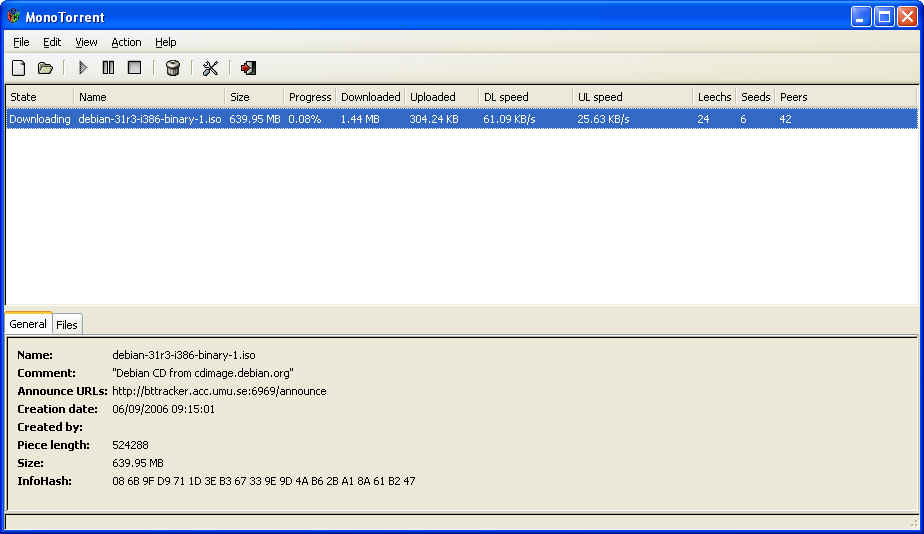
GUI running on Windows (This is Gtk# on Windows).
Alan keeps a To-Do list here, which should make it simple for people to help in the effort.
Posted on 30 Oct 2006
Mono Meeting and the Olive Project.
The Mono Meeting is over, it was a couple of very intensive days, and I managed to get very little sleep.
The slides for the presentations are here:
- Mono Roadmap, opening presentation.
- The db4o embedded database.
- DekiWiki and the Dream Framework
- The Cecil CIL Manipulation Library.
- Grasshopper: running .NET applications on J2EE servers.
- Indigo and Infocard in Mono.
- Security, CAS, Monoxide and Crimson.
- Mono's Compacting GC work.
- Visual Studio and Mono integration
- Gtk# Roadmap.
- Mono Code Generation and Performance.
- Mono Debugger.
- NUnit and Mono.
Olive: Infocard and Indigo
On Monday Atsushi checked into the olive module the initial implementation of Indigo and Infocard.
The status of the module is kept here and contains a human readable report of where we are standing. It is only the beginning, but some simple applications are able to run now.
Hopefully in the next few days I will have time to write down a few more lines about everything we talked about in the public Mono meeting and in our internal discussions.
Posted on 25 Oct 2006
Brunch
For those of you coming to the Mono Meeting early today (the "early-arrivers"), we will be having brunch at noon in Casa Romero.
Posted on 22 Oct 2006
Mono on Alpha
Sergey Tikhonov has been working for a few months on an Alpha port of the Mono JIT. The port can currently bootstrap itself (a sanity test that is used by all Mono ports), and the port is able to build the usual Mono GUI libraries (Gtk# and the Gtk# apps).
Currently the port still lacks varargs support, debugger support, global register usage and some peephole optimizations.
All of this code is now on SVN, and will appear shortly on the Mono 1.1.18 release.
Mark Mason has been working on a MIPS port, and he said this morning that the port is now "limping along". Not quite sure what that means until we see the patch.
Now all we need is a m68k to conquer the Atari ST world and a VAX port for all of you that still run an 11/780 in your basement.
Posted on 11 Oct 2006
?? Operator
Today Jon pointed me to C#'s "??" operator, this is really the kind of thing that I should know. The operator is part of the nullable-type family of operators, but I did not know that you could use this with regular expressions.
Its lovely, the expression: a ?? b evaluates to a if a is not null, or to b if a is null.
Very handy, replaces the idiom: a == null ? b : a.
This is only available in the gmcs compiler.
Posted on 06 Oct 2006
Compiler merge
Mono's C# compiler was forked a few years ago (mid 2003) when we started developing the generic extensions to the language. We did this because the generic specification at the time was still in flux, and this new compiler was sort of a research compiler for us. We did not want to destabilize our production compiler (mcs) with generics at the time, so we kept the new compiler on its own tree (gmcs).
The downside is that ever since, we have had to merge all the improvements and bug fixes done to the generics which required a considerable effort.
Things have luckly changed. The C# generics specification is complete and gmcs is now stable.
This past week Martin and Harinath completed the merging of mcs with gmcs. Now we have a unified source code base, the only place where we have kept the code base divided is the tokenizer and the parser. This is ok, as we are considering writing a hand-written parser instead of the yacc generated parser that we use today.
This effort started because Martin did some major architectural changes in the anonymous method and iterator support.
Posted on 05 Oct 2006
Dick's Portability Layer
One of the most common problems that people face when porting applications from Windows to Linux using Mono are paths.
The Problem
Windows developers are used to a case-insensitive file system, which means that they might create a file called "mydata" in one place, and try to access it somewhere else as "MyData" or as "MYDATA". This of course breaks on most Unix setups because Windows is case insensitive[1].
Another problem is that developers on Windows are known to hardcode the directory separator character in their source code ("\") instead of using Path.DirectorySeparator and using Path.Combine for combining this paths. This is a problem because "\" is a valid file name components on Unix. This means that if an application hardcodes for example "Logs\access_log", in Unix this will not store the contents in the "Logs" directory as the file "access_log". Instead, it will store the results in a file called "Logs\access_log".
Only a few applications cope with drive letters, but they might still pose a problem as the colon is a valid filename in Unix, which means that "A:\file" is a valid filename in the current directory.
Although .NET provides the tools to write code that is portable, in practice, they do not use these features (the exception is Path.Combine, which some people use, as it is genuinely useful on its own).
The Usual Solution
When moving applications from Windows to Linux, it is always necessary to run the application, run its test suite, and validate that the application works as intended. With the path problems described above, the process above included a number of iterations to fix the assumptions made by programmers about the file system.
This process could be time consuming, because identifying where the mistakes were made could take some time, the program might fail with FileNotFound exceptions (when referencing files that were not there), data would show up empty (listing contents of a directory that had nothing, as all the data went elsewhere) but it was doable.
This process works as long as you have the source code to all the components that you are porting, but if you were using a third-party library that you had no source code for, you would not be able to fix the problems.
The New Solution
This week, Dick Porter introduced a portability layer into Mono that will address those problems without requiring changes to your code. This will remove a large component of the porting cycle as a whole class of obnoxious problems are gone.
The new portability framework is enabled by setting the environment variable MONO_IOMAP (which we will likely rename to something shorter) to one of the following values:
- case: makes all file system access case insensitive.
- drive: strips drive name from pathnames.
- all: enables both case and drive.
In addition, if any of those options are enabled, the directory separator mapping is also turned on. So this basically means that you have to type this, or include this in your script that launches your application:
	$ export MONO_IOMAP=all
	$ mono myapp.exe
For ASP.NET applications hosted with mod_mono, you can add the following directive to your Apache configuration file:
MonoSetEnv MONO_IOMAP=all
This new feature will appear in Mono 1.1.18.
The downside is that Mono will have to do some extra work when coping with your file system, to search for case insensitive file names. So if your application is still a portable application, you will be much better off without this switch.
[1] Some Linux file systems are case insensitive, and some folks have used a combination of hacks, including doing loopback CIFS mounts to get case sensitivity issues out of the way; OS X does not have this particular problem, but it still has the others.
Posted on 05 Oct 2006
Dave Winer
Dave Winer did post about the new bill in Congress, two posts:
Posted on 03 Oct 2006
Mexico City Talk: MonoDevelop, an IDE for developing desktop
Lluis Sánchez ofrecerá una charla sobre Mono y MonoDevelop en la Facultad de Ciencias en la UNAM.
La cita es este Miércoles 4 de Octubre a las 5pm en el anfiteatro Alfredo Barrera de la Facultad de Ciencias.
Lluis es el desarrollador principal de MonoDevelop hoy en dia, y ha sido responsable de la integración del nuevo diseñador de formas Stetic, y es responsable de varios componentes importantes en Mono como Remoting, Serialización y los servicios de Web.
Posted on 03 Oct 2006
New York Times Reader
I just downloaded and installed the Avalon-based the New York Times reader.
This is one nice Avalon application, it distinguishes itself from all the samples that I have seen because it lacks a video playing in the background, and the buttons have not been rotated 30 degrees. It is one cute application, and I might have to eat my own words if someone from the New York Times developer team starts raving about their experience.
A few years ago, before the Ajax revolution, it was to me pretty clear that Flash based frameworks and Avalon would pose a real threat to the web as we know it. Unlike the Web, developing applications with Flash or Avalon could be a more consistent developer experience than the combination of HTML, HTTP, CSS and JavaScript and the dozen other elements that must be mastered to create modern web applications. At least, they have a certain appeal to some developer segments.
Robert O'Callahan from Novell weighs in on this subject, and offers a few alternatives on how things could be improved on the web world.
Of course, the real solution is for someone to implement an open source Avalon stack to run on top of Mono. No applause, just throw money.
Or developers.
Posted on 02 Oct 2006
US Constitution 2.0
An updated version of the US Constitution was unveiled last week, a good summary is here.
I have only noticed the commentary on a few political web sites about the impact of the new legislation, I was expecting everyone to be up in arms about it.
The New York Times article Editorial has a good summary of the problems:
Here’s what happens when this irresponsible Congress railroads a profoundly important bill to serve the mindless politics of a midterm election: The Bush administration uses Republicans’ fear of losing their majority to push through ghastly ideas about antiterrorism that will make American troops less safe and do lasting damage to our 217-year-old nation of laws — while actually doing nothing to protect the nation from terrorists. Democrats betray their principles to avoid last-minute attack ads. Our democracy is the big loser.Republicans say Congress must act right now to create procedures for charging and trying terrorists — because the men accused of plotting the 9/11 attacks are available for trial. That’s pure propaganda. Those men could have been tried and convicted long ago, but President Bush chose not to. He held them in illegal detention, had them questioned in ways that will make real trials very hard, and invented a transparently illegal system of kangaroo courts to convict them.
It was only after the Supreme Court issued the inevitable ruling striking down Mr. Bush’s shadow penal system that he adopted his tone of urgency. It serves a cynical goal: Republican strategists think they can win this fall, not by passing a good law but by forcing Democrats to vote against a bad one so they could be made to look soft on terrorism.
Last week, the White House and three Republican senators announced a terrible deal on this legislation that gave Mr. Bush most of what he wanted, including a blanket waiver for crimes Americans may have committed in the service of his antiterrorism policies. Then Vice President Dick Cheney and his willing lawmakers rewrote the rest of the measure so that it would give Mr. Bush the power to jail pretty much anyone he wants for as long as he wants without charging them, to unilaterally reinterpret the Geneva Conventions, to authorize what normal people consider torture, and to deny justice to hundreds of men captured in error.
These are some of the bill’s biggest flaws:
Enemy Combatants: A dangerously broad definition of “illegal enemy combatant” in the bill could subject legal residents of the United States, as well as foreign citizens living in their own countries, to summary arrest and indefinite detention with no hope of appeal. The president could give the power to apply this label to anyone he wanted.
The Geneva Conventions: The bill would repudiate a half-century of international precedent by allowing Mr. Bush to decide on his own what abusive interrogation methods he considered permissible. And his decision could stay secret — there’s no requirement that this list be published.
Habeas Corpus: Detainees in U.S. military prisons would lose the basic right to challenge their imprisonment. These cases do not clog the courts, nor coddle terrorists. They simply give wrongly imprisoned people a chance to prove their innocence.
Judicial Review: The courts would have no power to review any aspect of this new system, except verdicts by military tribunals. The bill would limit appeals and bar legal actions based on the Geneva Conventions, directly or indirectly. All Mr. Bush would have to do to lock anyone up forever is to declare him an illegal combatant and not have a trial.
Coerced Evidence: Coerced evidence would be permissible if a judge considered it reliable — already a contradiction in terms — and relevant. Coercion is defined in a way that exempts anything done before the passage of the 2005 Detainee Treatment Act, and anything else Mr. Bush chooses.
Secret Evidence: American standards of justice prohibit evidence and testimony that is kept secret from the defendant, whether the accused is a corporate executive or a mass murderer. But the bill as redrafted by Mr. Cheney seems to weaken protections against such evidence.
Offenses:The definition of torture is unacceptably narrow, a virtual reprise of the deeply cynical memos the administration produced after 9/11. Rape and sexual assault are defined in a retrograde way that covers only forced or coerced activity, and not other forms of nonconsensual sex. The bill would effectively eliminate the idea of rape as torture.
There is not enough time to fix these bills, especially since the few Republicans who call themselves moderates have been whipped into line, and the Democratic leadership in the Senate seems to have misplaced its spine. If there was ever a moment for a filibuster, this was it.
We don’t blame the Democrats for being frightened. The Republicans have made it clear that they’ll use any opportunity to brand anyone who votes against this bill as a terrorist enabler. But Americans of the future won’t remember the pragmatic arguments for caving in to the administration.
They’ll know that in 2006, Congress passed a tyrannical law that will be ranked with the low points in American democracy, our generation’s version of the Alien and Sedition Acts.
New York Times
Antiterrorism Bill on Detainees, Geneva Conventions
Rushing Off a Cliff
September 28th, 2006.
And of course, the problem is that these new provision are easily misused and abused: like the DMCA is misused and abused; like the war-on-drugs legislation is misused and abused and like the Patriot Act is misused and abused.
Amy and David Goodman recently published Static: Government Liars, Media Cheerleaders and the People Who Fight Back a book that quotes extensively from the interviews they have done on their radio program on Democracy Now. The book is packed with first-hand accounts of people who have received the short end of the stick.
Posted on 02 Oct 2006
SQL Injection
Scott has an interesting post detailing the risks of SQL injection.
I made that mistake myself when I wrote the contributions web service for Monodoc. Until a few months ago, our Monodoc service had this very problem. Pablo Orduña contacted me off-line and even provided fixes to our web service to fix the issue. Highly recommended reading for anyone writing web apps.
Posted on 02 Oct 2006
Blog Search
Archive
- 2024
Apr Jun - 2020
Mar Aug Sep - 2018
Jan Feb Apr May Dec - 2016
Jan Feb Jul Sep - 2014
Jan Apr May Jul Aug Sep Oct Nov Dec - 2012
Feb Mar Apr Aug Sep Oct Nov - 2010
Jan Feb Mar Apr May Jun Jul Aug Sep Oct Nov Dec - 2008
Jan Feb Mar Apr May Jun Jul Aug Sep Oct Nov Dec - 2006
Jan Feb Mar Apr May Jun Jul Aug Sep Oct Nov Dec - 2004
Jan Feb Mar Apr May Jun Jul Aug Sep Oct Nov Dec - 2002
Jan Feb Mar Apr May Jun Jul Aug Sep Oct Dec
- 2022
Apr - 2019
Mar Apr - 2017
Jan Nov Dec - 2015
Jan Jul Aug Sep Oct Dec - 2013
Feb Mar Apr Jun Aug Oct - 2011
Jan Feb Mar Apr May Jun Jul Aug Sep Oct Nov Dec - 2009
Jan Feb Mar Apr May Jun Jul Aug Sep Oct Nov Dec - 2007
Jan Feb Mar Apr May Jun Jul Aug Sep Oct Nov Dec - 2005
Jan Feb Mar Apr May Jun Jul Aug Sep Oct Nov Dec - 2003
Jan Feb Mar Apr Jun Jul Aug Sep Oct Nov Dec - 2001
Apr May Jun Jul Aug Sep Oct Nov Dec