Dropbox Lack of Security
I am a fan of Dropbox. It is a great tool, a great product, and clearly they have a passionate team over at Dropbox building the product.
Dropbox recently announced an update to its security terms of service in which they announced that they would provide the government with your decrypted files if requested to do so.
This is not my problem with Dropbox.
My problem is that for as long as I have tried to figure out, Dropbox made some bold claims about how your files were encrypted and how nobody had access to them, with statements like:
- All transmission of file data occurs over an encrypted channel (SSL).
- All files stored on Dropbox servers are encrypted (AES-256)
- Dropbox employees aren't able to access user files, and when troubleshooting an account they only have access to file metadata (filenames, file sizes, etc., not the file contents)
But anyone that tried to look further came out empty handed. There really are no more details on what procedures Dropbox has in place or how they implement the crypto to prevent unauthorized access to your files. We all had to just take them at their word.
This wishy-washy statement always made me felt uneasy.
But this announcement that they are able to decrypt the files on behalf of the government contradicts their prior public statements. They claim that Dropbox employees aren't able to access user files.
This announcement means that Dropbox never had any mechanism to prevent employees from accessing your files, and it means that Dropbox never had the crypto smarts to ensure the privacy of your files and never had the smarts to only decrypt the files for you. It turns out, they keep their keys on their servers, and anyone with clearance at Dropbox or anyone that manages to hack into their servers would be able to get access to your files.
If companies with a very strict set of security policies and procedures like Google have had problems with employees that abused their privileges, one has to wonder what can happen at a startup like Dropbox where the security perimeter and the policies are likely going to be orders of magnitude laxer.
Dropbox needs to come clear about what privacy do they actually offer in their product. Not only from the government, but from their own employees that could be bribed, blackmailed, making some money on the side or are just plain horny.
Dropbox needs to recruit a neutral third-party to vouch for their security procedures and their security stack that surrounds users' files and privacy. If they are not up to their own marketed statements, they need to clearly specify where their service falls short and what are the potential security breaches that
Unless Dropbox can prove that algorithmically they can protect your keys and only you can get access to your files, they need to revisit their public statements and explicitly state that Dropbox storage should be considered semi-public and not try to sell us snake oil.
Posted on 19 Apr 2011
Save the Date: Monospace Conferece in Boston
The dates for the MonoSpace conference have been announced: July 23rd to 25th, 2011. The event will take place at the Microsoft NERD Center.
The organizers have just made a call for speakers. If you have an interesting topic to discuss, please submit a talk, we would love to hear from you.
Posted on 18 Apr 2011
Save the Date: Monospace Conferece in Boston
The dates for the MonoSpace conference have been announced: July 23rd to 25th, 2011. The event will take place at the Microsoft NERD Center.
The organizers have just made a call for speakers. If you have an interesting topic to discuss, please submit a talk, we would love to hear from you.
Posted on 18 Apr 2011
Mono Android and iPhone Updates
Today we are happy to release Mono for Android 1.0 as well as MonoTouch 4.0.
Both products allow you to use the C# language to write applications that run on Android and iOS devices.
Both products are based on the latest Mono 2.10 core. The Parallel Frameworks can be used to write more elegant multi-threaded code across all devices, and automatically takes advantage of multiple cores available on the iPad2 and Xoom devices. The C# 4.0 is now the default as well as the .NET 4.0 APIs.
Mono for Android
Our  Mono
for Android debuts today after almost a year worth of
development.
Mono
for Android debuts today after almost a year worth of
development.
Perhaps the most important lesson that we got from MonoTouch's success was that we had to provide a completely enabled platform. What we mean by this is that we needed to provide a complete set of tools that would assist developers from creating their first Android application, to distributing the application to the market place, to guides, tutorials, API documentation and samples.
Mono for Android can be used from either Visual Studio Professional 2010 for Windows users, or using MonoDevelop on the Mac.

Mono code runs side-by-side the Dalvik virtual machine in the same process:
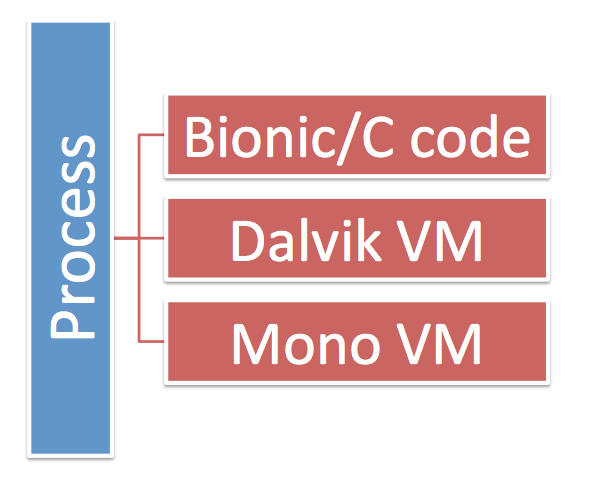
This is necessary since code running in Dalvik provides the user interface elements for Android as well as the hosting and activation features for applications on Android.
APIs
The Mono for Android API is made up of the following components: Core .NET APIs, Android.* APIs, OpenGL APIs and Java bridge APIs.
Let us start with the most interesting one: Android.* APIs. These are basically a 1:1 mapping to the native Java Android APIs but they have been C#-ified, for example, you will find C# properties instead of set/get method calls, and you will use C# events with complete lambda support (with variables being automatically captured) instead of Java inner classes. This means that while in Java you would write something like:
	// Java code
	button.setOnClickListener (new View.OnClickListener() {
             public void onClick(View v) {
		button.setText ("Times clicked: " + Integer.toString(counter));
             }
         });
	// C# code
	button.Click += delegate {
		button.Text = "Times clicked: " + counter;
	};
In addition to the UI APIs, there are some 57 Android.* namespaces bound that provide access to various Android features like telephony, database, device, speech, testing and many other services.
In what is becoming the standard in the Mono world, OpenGL is exposed through the brilliant OpenTK API. OpenTK is a strongly typed, Framework Design Guidelines-abiding binding of OpenGL. The benefit is that both Visual Studio and MonoDevelop can provide intellisense hints as you develop for the possible parameters, values and their meaning without having to look up the documentation every time.
Finally, for the sake of interoperability with the native platform, we exposed many types from the Java.* namespaces (31 so far) that you might need if you are interoperating with third party libraries that might require an instance of one of those Java.* types (for example, a crypto stack might want you to provide a Javax.Crypto.Cipher instance. We got you covered.
Core Differences
Mono for Android has a few differences from MonoTouch and Windows Phone 7 when it comes to the runtime. Android supports JIT compilation while iOS blocks it at the kernel level and Windows Phone 7 has limitations.
This means that developers using Mono on Android have complete access to System.Reflection.Emit. This in turn means that generics-heavy code like F# work on Android as do dynamic languages powered by the Dynamic Language Runtime like IronPython, IronRuby and IronJS.
And of course, you can also use our own C# Compiler as a Service
Now, although those languages can run on Mono for Android, we do not currently have templates for them. The Ruby and Python support suffer due to Android limitations. The Dalvik virtual needs to know in advance which classes you customize, and since it is not really possible to know this with a dynamic language, the use of Iron* languages is limited in that they cant subclass Android classes. But they can still call into Android APIs and subclass as much .NET class libraries as they want.
Native User Interfaces
MonoTouch and MonoDroid share a common runtime, a common set of class libraries, but each provides different user interface and device specific APIs.
For example, this code takes advantage of iOS's UINavigationController and animates the transition to a new state in response to a user action:
void OnSettingsTapped ()
{
	var settings = new SettingsViewController ();
	PushViewController (settings, true);
}
This is an equivalent version for Mono for Android:
void OnSettingsTapped ()
{
	var intent = new Intent ();
	intent.SetClass (this, typeof (SettingsActivity));
	StartActivity (intent);
}
We chose to not follow the Java write-once-run-anywhere approach for user interfaces and instead expose every single bit of native functionality to C# developers.
We felt that this was necessary since the iOS and Android programming models are so different. We also wanted to make sure that everything that is possible to do with the native APIs on each OS continues to be possible while using Mono.
For instance, if you want to use CoreAnimation to drive your user interactions, you should be able to leverage every single bit of it, without being forced into a common denominator with Android where nothing similar to this is available.
Craig Dunn, one of the authors of the MonoTouch Programming Book, has written a nice Mosetta Stone document that compares side-by-side some of the key UI differences across platforms.
He also has written the Restaurant Guide Sample which sports a unique user interface for Android, iOS and Windows Phone 7:
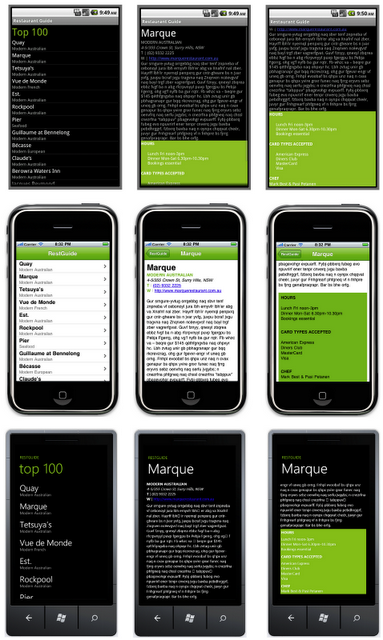
You can take a look
at this
cross platform sample from GitHub.
Faced with the diversity of platforms to support, both
mobile and desktop, this is a good time to design, refactor
and prepare your code for this new era.
Today developers can use C# to target various UIs:
To give your code the most broad reach, you should consider
splitting your backend code from your presentation code.
This can be done by putting reusable code in shared libraries
(for example, REST clients) and shared business logic on its
own libraries.
By splitting your presentation code from your business
logic code for your application, not only you gain the ability
to create native experiences in each platform, you also get a
chance to test your business logic/shared libraries more
easily.
In Mono for Android when you build an application for
distribution, we embed the Mono runtime with your application.
This is necessary so your application is entirely
self-contained and does not take any external dependencies.
Mono for Android uses
the Mono
Linker to ensure that only the bits of Mono that you
actually use end up in your package and that you do not pay a
high tax for just using a handful of functions.
For example, if you want to just use a method from
XElement, you would only pay the price for using this class
and any of its dependencies. But you would not end up
bringing the entire System.XML stack: you only pay for what
you use.
During development a different approach is used: the Mono
runtime is installed on your emulator or test device as a
shared runtime. This minimizes both the build and deploy
times.
Start with
our documentation
portal, there you will find
our Installation
Guide, a tutorial
for your
first C# Android application,
our tutorials
(many ported from their Java equivalents) and
our How-To
Guides and a large collection
of sample programs.
You can also explore the documentation for the Mono for
Android API in a convenient to remember url: docs.mono-android.net.
The first book
of Mono
for Android will be available on July 12th. In the
meantime, we have created many tutorials and guides that will
help you go
I also strongly suggest those interested in parallel
programming to check out
the Patterns
for Parallel Programming: Understanding and Applying Parallel
Patterns with the .NET Framework 4. This is a free PDF,
and is a must-read for anyone building multi-core applications.
Mono for Android would not have been possible without the
hard work of the MonoDroid team at Novell. The team worked
around the clock for almost a year creating this amazing
product.
The team was backed up by the Mono core team that helped us
get C# 4.0 out, WCF, the linker, the LLVM support, improve the VM,
extend the MonoDevelop IDE, scale Mono, improve our
threadpool, support OpenTK, implement the Parallel
Frameworks, ship dozens of betas for MonoDevelop, Mono and
Mono for Android.
Split your Presentation from your Engine
Linking
Mono for Android References
Thank You!
Posted on 06 Apr 2011
Blog Search
Archive
- 2024
Apr Jun - 2020
Mar Aug Sep - 2018
Jan Feb Apr May Dec - 2016
Jan Feb Jul Sep - 2014
Jan Apr May Jul Aug Sep Oct Nov Dec - 2012
Feb Mar Apr Aug Sep Oct Nov - 2010
Jan Feb Mar Apr May Jun Jul Aug Sep Oct Nov Dec - 2008
Jan Feb Mar Apr May Jun Jul Aug Sep Oct Nov Dec - 2006
Jan Feb Mar Apr May Jun Jul Aug Sep Oct Nov Dec - 2004
Jan Feb Mar Apr May Jun Jul Aug Sep Oct Nov Dec - 2002
Jan Feb Mar Apr May Jun Jul Aug Sep Oct Dec
- 2022
Apr - 2019
Mar Apr - 2017
Jan Nov Dec - 2015
Jan Jul Aug Sep Oct Dec - 2013
Feb Mar Apr Jun Aug Oct - 2011
Jan Feb Mar Apr May Jun Jul Aug Sep Oct Nov Dec - 2009
Jan Feb Mar Apr May Jun Jul Aug Sep Oct Nov Dec - 2007
Jan Feb Mar Apr May Jun Jul Aug Sep Oct Nov Dec - 2005
Jan Feb Mar Apr May Jun Jul Aug Sep Oct Nov Dec - 2003
Jan Feb Mar Apr Jun Jul Aug Sep Oct Nov Dec - 2001
Apr May Jun Jul Aug Sep Oct Nov Dec