Rodrigo Kumpera Completes the Mono Verifier
Rodrigo Kumpera, one of our VM developers has completed the instruction verifier for Mono's virtual machine. This effort started in June of last year.
The verifier is a late addition to the Mono VM as it was not a priority to run untrusted code inside the virtual machine.
But as Mono user base grew, it became important to support this feature. Second Life needs this to run potentially malicious code that is uploaded by a user, and we need this to provide an execution sandbox when running Moonlight on the browser.
Rodrigo did this work in stages: the first stage was to add support for the 1.0 virtual machine opcodes. Once that was done, verificiation for the 2.0 generic instructions was added.
This is an important milestone in our support for Silverlight 2.0 support on Linux.
Congratulations to Rodrigo for his work!
Posted on 30 Apr 2008
Mono and the Google Summer of Code 2008
This year Mono is participating again on the Google Summer of Code. A list of the applications that were accepted is available at Google's page.
This year the quality of the applications and the new ideas submitted (aside from those we proposed) was fantastic. They were too good, and it was very hard to select the final projects (we wanted to pick 33 of the 75 projects proposed, but there were only 15 slots available).
Posted on 28 Apr 2008
LinuxersForObama
Linuxers, BSDers, FLOSSers, GNUers, OSSers, Mysqlers, Gnomers, KDErs, Monoers, Javaers, PHPers, I invite you to donate to Obama through the LinuxersForObama campaign hosted at My.BarackObama.com web site.
If you are a US citizen, or a legal immigrant (green card holder), you can contribute 10, 20, or perhaps 2,300 to the Obama campaign.
You can donate here http://my.barackobama.com/page/outreach/view/main/LinuxersForObama.
I called the campaign "LinuxersForObama" because its short. I know it should have been called "GNULinuxBSDApacheX11PythonPerlMySQLPostgressPerlRubyJavaRailsMonoForObama", but it was getting hard to type.
And if you are a Windowser or Mac()er, but you like how Linuxers stick it to the man, feel free to donate to my LinuxersForObama campaign.
In retrospect, I should have created one campaign per product, and use that to settle once and for all, which is the best FLOSS project.
Posted on 18 Apr 2008
Standalone Silverlight Applications
 Last year we created a framework to run Silverlight
applications as native applications. At the time we called
those
applications moonlight
desklets.
Last year we created a framework to run Silverlight
applications as native applications. At the time we called
those
applications moonlight
desklets.
The desklets are Silverlight applications that run in standalone mode, with full access to the entire Mono API stack (as opposed to be limited to the .NET subset for the web) and that can optionally render without frames. This is a screenshot from three desklets running on Linux from last year:
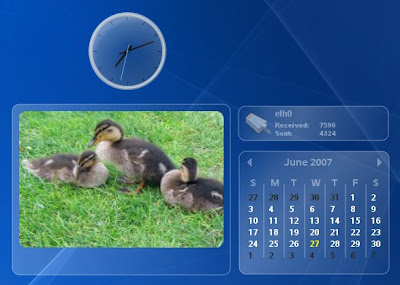
Beyond hack-value, there are in my opinion many reasons why this is valuable. Powerful .NET programming model, powerful graphics and animation framework, reuse the same code base for Web and desktop development, and a sandboxed execution model.
Many people have asked us privately about this.
The Magical mopen Command
To run a standalone desklet, all you have to do run the mopen command, like this:
$ mopen ruler
The above command will look for a directory called "ruler" listed in your PATH, and if the file default.xaml lives inside that directory, it will open that file up. This XAML file can in turn reference managed code.
We did this so applications could be deployed in directories, very much like they are deployed on MacOS. The rules are simple, applications should be self-contained, keep all their data relative to their executable base directory, the foundation for this started with our application deployment guidelines.
It also draws inspiration from the bundles from MacOS X and the `open' command there.
How does this work? Lets consider our enterprise pixel measuring tool, the Moonlight ruler, which is made up of two files:
- default.xaml, the basic XAML container, it references the managed code in ruler.dll
- ruler.cs contains the code to draw the ruler.
This is what it looks like when you run it:
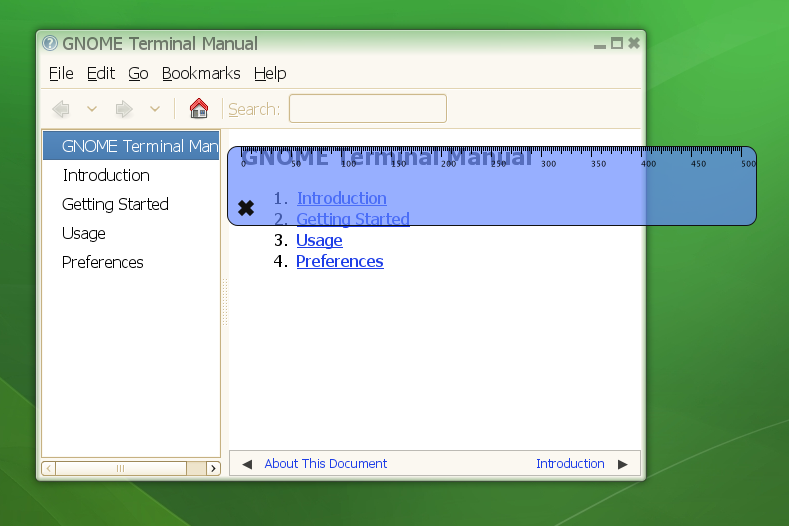
Awesome Moonlight desktop ruler.
Details
At LugRadio Live this weekend in San Francisco I decided to turn my Mono talk into a Moonlight talk, and I discussed some of the things that we have been doing with Moonlight.
Let me start with this artist rendition of Moonlight's Core:
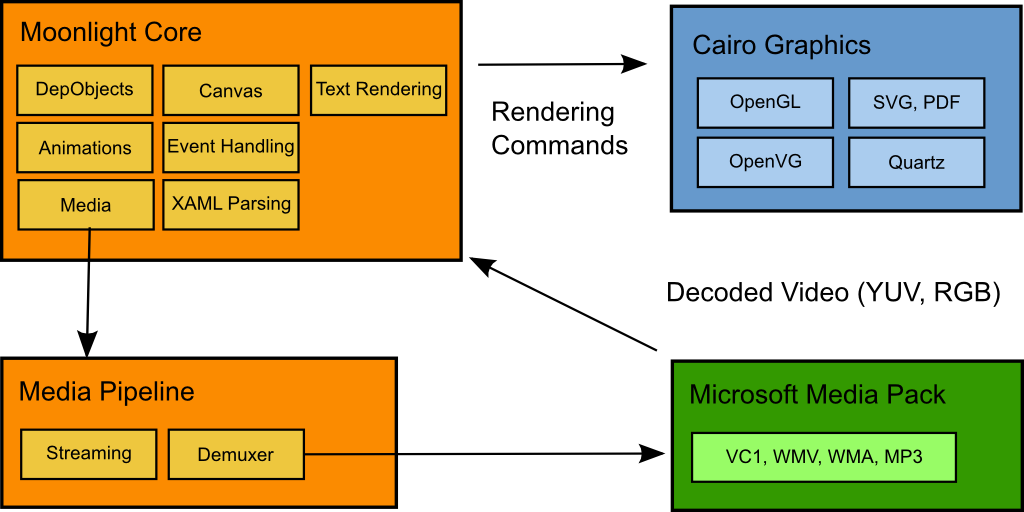
The orange pieces were built by the Mono/Moonlight team at Novell. The green pieces are provided by Microsoft (and only for use in the browser context, we will get back to this later) and the blue stuff is stuff that we consume from the community.
The Moonlight Core provides the high-level canvas, the XAML loading, the animation framework, timers, media streaming and demuxing and event dispatching. It also has very few dependencies, it uses Cairo to render graphics and interfaces with our media pipeline and needs codecs to do video (currently ffmpeg if you build from source, or Microsoft's when we release).
Our engine today has three frontends:

The most important one of course is the plugin front-end, the one that is embedded into Firefox and renders the Silverlight content.
The other front-end is a Gtk# widget, a simple Gtk+ host that embeds the Moonlight Core into a widget and allows developers to embed any kind of XAML content (including managed code) inside it. I did a demo of Banshee embedding a grid of video players at LugRadio.
This is a widget that can be used to spice up your application. If you feel that you need some bling for your application, some gratuitous animations and special effects, the GtkSilver widget can help you. Using it is trivial:
	using Gtk.Moonlight;

	[...]
	void SetupWidget ()
	{
		Application.Init ();

		GtkSilver surface = new GtkSilver ();

		surface.LoadFile ("MyAnimation.xaml");


		Window w = new Window ("Demo");
		w.Add (surface);
		w.ShowAll ();
		Application.Run ();
	}
If you want to get a handle on specific objects, you can just use the FindName method on the surface's canvas:
	MediaElement handler = (MediaElement) surface.Canvas.FindName ("MyVideoPlayer");

	// Start playback.
	handler.Play ();
And the third interface is the fabulous mopen command that we previously described (which is conveniently implemented on top of GtkSilver; yes, we know, we are geniuses).
The Two Stacks
As you might suspect from reading about GtkSilver and the browser, the Moonlight managed stack (that is, the C#/.NET APIs) actually comes in two shapes:
- Browser API: This is what people creating Silverlight applications are familiar with. Its a subset of .NET 3.5 and it has limitations as to what you can do: no local file system access and a sandbox that encapsulates all the actions of Silverlight applications.
- Full API: We also offer the full API, this is our implementation of .NET 3.5 that has been augmented with the Silverlight APIs.
As you can guess, GtkSilver and the desklets today use the Full API; And our browser plugin uses the more limited Browser API and the security sandbox.
We will get back to this soon.
Adobe Air
Adobe AIR has a great experience for installing native applications on your system, and they are cross platform (Windows, Mac and Linux).
I found a cute twitter application built with it, and have been a happy user of it for a few weeks (see screenshot).

I have no idea how extensive the AIR APIs are, whether they are sandboxed or whether they provide full access to all the APIs like our Moonlight Full API provides, but you can build some cute desktop applications with it.
I like it.
Silverlight Desktop Apps
Part of the reason why our Desklets did not evolve much in the last year was because there were no controls for them. You could build your own, but that was a lot of work, and it was hard to share, and most importantly, everyone knew that Microsoft was going to ship controls for Silverlight.
Now that controls are part of Silverlight 2.0 and that most of the high-level controls have been open sourced and that they are incredibly powerful and great to skin it makes sense to think again about native desktop applications using Silverlight.
We as a team can certainly create a Linux-only platform for these controls, and live happily with mopen, but we would miss an opportunity of having something cross platform like AIR is.
Ideally, Microsoft would follow our direction and implement and distribute the same mopen functionality that we have for Windows and Mac. This would ensure maximum adoption of standalone Silverlight-applications.
In a less ideal world, we (the Mono/Moonlight community) could port Moonlight's mopen command to Windows and MacOS, but with none of the power of influence that Microsoft has.
Directions and Challenges
Michael Hutchinson has suggested that we should have an minstall tool in the same spirit of mopen. This tool would take care of installation on each platform, creating shortcuts, desktop links and using the right icon.
Moonlight currently runs on systems with Cairo, and requires Gtk+ for event processing. It might be interesting to get it running on Win32, OSX and others with the tiniest footprint possible (bundling Gtk+ for Windows and MacOS for native apps sound large).
Another alternative is to use Microsoft's Silverlight on Windows to implement `mopen' as opposed to porting Moonlight. Apparently its possible to instantiate it through COM in some form, but that would still leave OSX out.
The codecs that Microsoft will distribute for use with Moonlight are limited to use inside the browser. This will prevent Moonlight's standalone applications from playing back any vc-1, wmv, wma, mp3 content.
We could add OS-specific codecs; On Linux we could call into Fluendo's commercial codecs, on Windows and Mac use the system codecs.
But we could also standardize on free video and audio codecs for the desktop edition: add support for the free video and audio codecs (BBC's Dirac, which will become VC-2, Vorbis and Theora).
We are currently busy doing Moonlight 1.0, and then we will get busy doing 2.0. So we will not be able to spend time on any of these projects for quite some time, but these are projects that developers in the community could work on or companies interested in pushing Moonlight in that direction.
Discuss.
Posted on 17 Apr 2008
Mono C# compiler now also MIT X11 licensed
I know, so exciting, a license.
We are dual-licensing under this uber-liberal license because:
We are changing the license to allow parts of the compiler to be reused as part of MonoDevelop, our LINQ class libraries and to embed it in ASP.NET.
In MonoDevelop: This will allow the compiler to be used to improve code-completion to support C# 3.0 as well as improving the heuristics when offering completions. This will reuse the front end and parts of the backend.
Compiler hosting inside ASP.NET: This will embed the whole compiler into the ASP.NET process, eliminating about one second for each compilation of a piece of code. In the past, for each request for an uncompiled resource, we would have to call the compiler, wait for its output and then load the output. This typically shaves between 0.7 to 1 second on those scenarios, ideal to improve the developer experience.
LINQ Class Libraries: This will allow us to reuse parts of the compiler in our System.Core implementation for LINQ for the current 3.5 generation and upcoming generations. Many corner cases are handled by the compiler, and we will now be able to lift those pieces. This will mostly use the backend of the compiler.
Posted on 16 Apr 2008
Detailed InvalidCastException Goodness Comes to a VM Near You.
When you perform an invalid cast in Mono (trying to force one type into another with a cast) or JIT would throw an InvalidCastException. If you are lucky, you would get a line number (compile with -g, run with --debug), but if you had a complicated expression you would have no idea what the problem was.
A few weeks ago, in support of Marek's growing pains in tracking down some bugs, Zoltan checked in support for a new feature in the Mono runtime: --debug=casts. Now, When you pass this option to the runtime, it will report the type that you are trying to cast. This feature is not activated by default as it generates more code, and consumes more memory.
This sample:
	$ cat demo.cs
        class Test {
                static void Main ()
                {
                        string s = "hola";
                        object j = s;

                        object d = (Test) j;
                }
        }
	$ mono demo.exe

	Unhandled Exception: System.InvalidCastException: Cannot cast from source type to destination type.
	   at Test.Main () [0x00000]

	$ mono --debug=casts demo.exe

	Unhandled Exception: System.InvalidCastException: Unable to cast object of type 'System.String' to type 'Test'.
	  at Test.Main () [0x00008] in /tmp/demo.cs:10
Awesome.
Posted on 16 Apr 2008
Generic Code Sharing: Good and Bad News
Mark Probst has been working for the past few months on adding support to the Mono JIT to support generic code sharing. This is a technique that allows the JIT to share the same code generated for two differently instantiated types, for example:
	class Stack<T> {
	    T [] data = new T [10];
	    int top;

	    public void Push (T t) { data [top++] = t; }
	    public T    Pop  ()    { return data [--top]; }
	    public int  Count      { get { return top; } }
	}

	class Test {
		static void Main ()
		{
			Stack<long> ls = new Stack<long> ();
			ls.Push (10);

			Stack<Test> ts = new Stack<Test> ();
			ts.Push (new Test ());

			Console.WriteLine ("Count={0} {1}", ls.Count, ts.Count);
		}
	}
The JIT must generate different code for the actual Stack instantiation, one must contain a pointer (32 bits on 32 bit machines) and another one must contain 64 bits. So the structures are different in memory, and so is the implementation for Push and Pop.
But certain methods do not depend on the datatype sizes (for example) and could be shared regardless of how their container type is instantiated.
Mark posted the Good news, the bad news and his strategy to deal with the bad news. Am going to limit myself to the good news, and you can click on the link and read the thread for the bad news:
Now for some interesting statistics.  Apart from the runtime's test
suite I've used three other test suites/benchmarks, namely IronPython
(running pystone), Nemerle (compiling its own compiler) and FSharp
(compiling and running a Hello World program).  Here are the
Good-News-statistics.  The numbers given are "no sharing / sharing"
and have been collected on a 32 bit system:

IronPython
  Methods compiled: 3614 / 3368
  native code space used: 719k / 691k

Nemerle
  Method compiled: 7210 / 6302
  native code space used: 2001k / 1943k

FSharp
  Methods compiled: 15529 / 11431
  native code space used: 2193k / 2062k
See his post for the rest.
Update: Mark informs me that the "bad news" that I conveniently left out of this post (memory consumption in FSharp for bookkeeping was 600k of memory) has now been fixed.
The 600k of bookkeeping in the FSharp test has been now turned down to 14k. So we can scratch that "bad news" part. Congratulations Mark!
Posted on 16 Apr 2008
Open Source Powershell Implementation
This weekend ath the Code Camp in Waltham, Igor Moochnick announced the release of pash his open source power shell implementation. It currently runs on Linux, MacOS, WindowsCE and Windows.
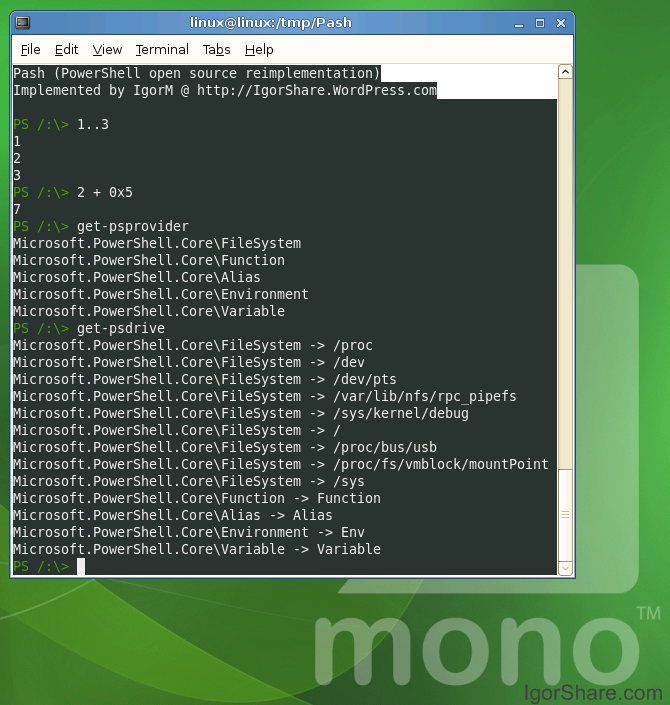
pash on Linux.
Igor's project is hosted on sourceforge.
A few years ago Ryan Paul from Arstechnica wrote a nice guide to powershell (when it was still called Monad Shell).
Posted on 07 Apr 2008
OOXML: The Wins
Regardless of where you stand on the outcome of OOXML becoming an ISO standard, it is worth pointing out that the opposition to OOXML pushed Microsoft into more open directions.
If you are sulking because OOXML was approved, it is worth looking at what actually was accomplished since December of 2005 when the process begun.
Before OOXML came to ISO and the global review of it begun:
- Microsoft moving away from their proprietary file formats to open, and XML-based (easier to manipulate, produce and consume) file formats.
- Novel raised a record number of issues on the specification, many of which were solved before the spec was approved by ECMA.
- About 700 pages worth of descriptions for the formula specifications (one of the major issues from our end when we joined ECMA TC45 in December of 2005).
- The OOXML specification placed under the OSP.
Once OOXML went for discussion at ISO, a number of good things came out and are major community wins:
1. The specifications for the old binary file formats were published under the OSP (February of 2008).
2. The above documents were backed up by the British Library in case Microsoft ever stops publishing them (announcement).
3. Microsoft is funding the development of a translator between the old binary file formats and OOXML which should assist folks that have experience in one format and want to understand the other, or just want to convert documents back and forth. If your app lacked support for OOXML, but had support for the old formats, you can use these tools.
4. Microsoft agreed that future versions of OOXML will be covered by the OSP a concern that some people had about future versions of the document.
5. Microsoft pledged to modify future versions of Office to implement the ISO version of OOXML.
6. working group was created to look into harmonization of OOXML and ODF, something that many developers involved in office suites have been advocating for a long time.
7. Microsoft pledged to support features to support other file formats as native file formats in their office suite:
Last year we sponsored a translator project that gave people the ability to read and write ODF files from Microsoft Office. Last month we announced that we would update the Office product so that the ODF translators could natively plug into Office and give people the same options they get from the other file formats. People will be able to set ODF as the default format in Office if that's what they want by simply installing the translators and then changing their settings.
8. Lots of clarifications went into the spec, and people should be happy about that.
9. And finally, now that OOXML is an ISO standard, as Patrick Durusau implied there are many winners.
Anyways, I wanted to keep this short and uplifting, this seems like a win for everyone all around.
Preemptive-reply-to-the-above-paragraph: I will not reply/approve any flames, FUD or half-truths.
Posted on 02 Apr 2008
Blog Search
Archive
- 2024
Apr Jun - 2020
Mar Aug Sep - 2018
Jan Feb Apr May Dec - 2016
Jan Feb Jul Sep - 2014
Jan Apr May Jul Aug Sep Oct Nov Dec - 2012
Feb Mar Apr Aug Sep Oct Nov - 2010
Jan Feb Mar Apr May Jun Jul Aug Sep Oct Nov Dec - 2008
Jan Feb Mar Apr May Jun Jul Aug Sep Oct Nov Dec - 2006
Jan Feb Mar Apr May Jun Jul Aug Sep Oct Nov Dec - 2004
Jan Feb Mar Apr May Jun Jul Aug Sep Oct Nov Dec - 2002
Jan Feb Mar Apr May Jun Jul Aug Sep Oct Dec
- 2022
Apr - 2019
Mar Apr - 2017
Jan Nov Dec - 2015
Jan Jul Aug Sep Oct Dec - 2013
Feb Mar Apr Jun Aug Oct - 2011
Jan Feb Mar Apr May Jun Jul Aug Sep Oct Nov Dec - 2009
Jan Feb Mar Apr May Jun Jul Aug Sep Oct Nov Dec - 2007
Jan Feb Mar Apr May Jun Jul Aug Sep Oct Nov Dec - 2005
Jan Feb Mar Apr May Jun Jul Aug Sep Oct Nov Dec - 2003
Jan Feb Mar Apr Jun Jul Aug Sep Oct Nov Dec - 2001
Apr May Jun Jul Aug Sep Oct Nov Dec