Saturday Mono Update
Following a long established tradition of doing a quick Mono update after we do a major release, we released Mono 2.10.1 to the world.
There are four big features in this release that we backported from our master branch in addition to some 25 fresh bug fixes:
- Support for running OrchardCMS on Linux. We also wrote a PostgreSQL backend for it. You can find the patches in this discussion.
- The Parallel Framework's Default task scheduler has been switched to use our new and improved internal threadpool that we introduced with Mono 2.10. Previously it used its own (and amazing) scheduler, but did not share the same properties as .NET as there were by default two active threadpools, now there is only one.
- Plenty of updates to the WCF stack.
- OSX is a fast growing OS for Mono, this release brings performance counters for OSX as well as adding debugging symbols to all of our libraries if you install the CSDK package from our download page.
There were also three important regressions from Mono 2.8 that have been fixed. We encourage everyone to use Mono 2.10.1.
Posted on 26 Feb 2011
MVP Summit and GDC 2011
Next week I will be in Bellevue, WA from Sunday to Wednesday to participate in the 2011 Microsoft MVP Summit.
From Wednesday to Friday I will be San Francisco attending the Game Developer's Conference.
Ping me if you want to get together.
Posted on 25 Feb 2011
C# Compiler as a Service Update
Our C# compiler-as-a-service library can now process any C# construct, it is no longer limited to expressions and statements.
This means, that you can now enter entire class definitions in the command line:
csharp> class Demo {
      >     public int Add (int a, int b)
      >     {
      >          return a + b;
      >     }
      > }
csharp> new Demo ().Add (1, 3);
4
csharp>
This work was done by the amazing Marek and is now available on Mono's master branch in github.
This functionality can also be used for scripts, in particular in Unix, you can now create C# "source executable" files, like this:
bash$ cat demo.cs
#!/usr/bin/csharp
class Demo {
	public dynamic Add (dynamic a, dynamic b)
	{
		return a + b;
	}
}
Console.WriteLine (new Demo ().Add ("this is", " cute"));
bash$ chmod +x demo.cs
bash$ ./demo.cs
this is cute
bash$
Multiple Compiler Instances
In addition, we turned the static API Evalutor.Eval (string expression), into an instance API. The instance API allows developers that are embedding the C# compiler-as-a-service in their application to have different contexts.
This required the entire compiler to be updated from being a giant set of static classes that could safely use global variables and state into a state that was properly encapsulated.
The API is now richer, we provide a way to configure the compiler settings using a settings class. This can be populated either manually, or by using the build-in command-line parser for compiler options. The following sample shows how this could be used:
using Mono.CSharp;
using System;

class Runner {
	static int Main (string [] args)
	{
		var r = new Report (new ConsoleReportPrinter ());
		var cmd = new CommandLineParser (r);

		var settings = cmd.ParseArguments (args);
		if (settings == null || r.Errors > 0)
			Environment.Exit (1);

		var evaluator = new Evaluator (settings, r);

		evaluator.Run ("class Demo { public static int Add (int a, int b) { return a+b; }}");
		evaluator.Run ("print (Demo.Add (1,2));");
		return 0;
	}
}
Testers Wanted
This revamped compiler will be part of Mono 2.12, but we would love to get users to test the new functionality and to help us identify any problems early on, before we even release this code.
We do provide a convenient sln file that you can use the compiler as a service, and it works both in Visual Studio/.NET and Mono.
Silverlight
We have not tested this with Silverlight, but in theory, it should now work fine with it. We would love to see someone build an interactive shell like the one we did with Gtk# but hosted on the browser:

Posted on 24 Feb 2011
Well, Actually
Why you are not getting laid
 As software developers, we develop habits that
allow us to build products that work and do not fail under
stress. Every software developer knows what an "off-by-one"
error is, and like the Karate Kid, we train extensively so we
can avoid those traps. We learn how to avoid these and other
similar software problems and we sharpen our skills to find
logic errors.
As software developers, we develop habits that
allow us to build products that work and do not fail under
stress. Every software developer knows what an "off-by-one"
error is, and like the Karate Kid, we train extensively so we
can avoid those traps. We learn how to avoid these and other
similar software problems and we sharpen our skills to find
logic errors.
As we mature as developers, finding logic errors and incomplete solutions becomes our way of life. It defines us.
But our engineering strength is also our social weakness. Countless times as engineers you will find yourself interrupting someone telling a story, an anecdote or a joke to correct a false assumption, provide an extra fact that the narrator overlooked, give a bigger perspective on the problem or point out that the joke premise is actually flawed.
You can identify this behavior because the person interrupting usually starts with the phrase "Well, actually...".
As a kid, I thought this was my strength. I knew a little bit more than my sister. So whenever she would say something, I would quickly interject something like "Well, actually, the origin of the word Shih Tzu means Lion Dog and has nothing to do with the dog's digestive patterns".
Yes, I was really fun to hang out with.
As a child, I wondered why my sister could make friends and keep them so easily, while I could not. It would take me years to discover this. And now, as a public service I am sharing with you, my fellow geek friends, what I learned.
Whoever pulls a "well, actually" almost always shifts the conversation to himself. And now we are no longer following along with your friend's joke, we get to learn how much more you know about the limitations of the Sun Protection Factor scale in sunblock products.
You are doing it wrong
As a seasoned engineer, you need to learn control your impulses. Having dealt with my own well, actually problem, I can attest that adjusting this social behavior might even get you laid.
Jokes are funny because they surprise us. But a joke is not funny if you have to present a 30-page document setting up every little detail. An ill-placed "Well, actually" will get your colleagues to abandon in an instant the water cooler conversation and escape to the peaceful solitude of their workstations.
Range of Action
You can find full-time well-actually folks both in person or monitoring your every quip on twitter.
Even the most rudimentary of the well-actuallistas is able to spoil even the best Ricky Gervais material.
Twitter being a medium limited to 140 character is like catnip for patronizing douchebags. They can not resist the urge to point out logic flaws in your minimalist observation.
This is particularly a problem for those of us that love to tweet things that amuse us or that we find amusing. Fear of a barrage of factoids from an omitted detail can be paralyzing.
Dealing with the Well Actually crowd
The well-actually crowd wants as much as everyone else to participate in the conversation. They want to be loved.
But instead of rolling with the punches and participating in a brainstorm of ideas and exploding humor, they contribute interruptions, facts and details that merely produce stop energy on an ongoing discussion. They turn the center of attention towards them.
The well-actually crowd means well. They want to be loved, they just have not realized that they are undermining their own quest for friends.
If you are a sagacious well-actuallista you need to understand that you are not outwitting anyone. It takes more intelligence to build a joke, tell a funny anecdote or narrate a gripping story than it takes to nitpick.
You are not impressing anyone with your hard earned encyclopedic knowledge that you obtained by spending hours on the Internet. You are just making everyone around you realize that you are as much fun to have lunch with as a flaming turd in a bag.
Those of us in the receiving end of a well-actually, need to start an awareness campaign. Perhaps using Twibbons to cure this disease. Unlike many diseases, this awareness program will lead to a cure.
While being technically correct is the best kind of correct, what you don't realize is that while you enjoy the triumph of your well-actually, everyone around you is secretly hoping that you choke on a bucket of cocks.
Practical Solutions
In the office, we have lots of talented engineers and at one point or another one of us will interject a well placed "well, actually" at an innapropriate moment.
These days we are fully aware of this social disease and we strive to avoid it. When someone interrupts a discussion with a well-actually you can hear someone say:
"Did you just well-actually me?"
Which is basically a way of saying "That has nothing to do with the topic, but thanks for derailing us" without having to go into the explanation and getting lost on the tangent.
This is a good first step. In our case, we have printed copies of the Ok, It's Time To Explain Some Stuff Patronizing Douchebag Trollcat in two sizes: a full-size well-actually cat, and a small one that is given as an award to the douchiest interruption:

Okay it’s time to explain some stuff patronizing douchebag trollcat
On the Internet, you can try to point the patronizing douchebag to this blog post. Or if you have no patience, just click "block" on twitter.
Posted on 17 Feb 2011
Moonlight 4 Preview 1 is out
 Yesterday we
released Moonlight
4, Preview 1.
Yesterday we
released Moonlight
4, Preview 1.
This release of Moonlight completes the Moonlight 3 feature set and includes many features from Silverlight 4. Check out our release notes for the list of things that are currently missing from our Silverlight 4 support.
Rendering
Moonlight rendering system uses a painter's algorithm coupled with culling to reduce the amount of rasterization that needs to take place.
For example, if we had these objects all rendered at the same location, on top of each other:

A simple implementation would render the triangle, then the rectangle and then the circle, and we would get this result:

Moonlight optimizes this rendering by computing the bounding boxes of each element and determining which objects are completely obscured. In this case, the triangle never needs to be rendered as it is fully covered.
Since we have the entire graph scene in memory, we can push all the rendering to the X server without ever having to pull data back from it.
Each visible element on Silverlight derives from the class UIElement and Moonlight tracks the bounding box for all of each individual element. As you compose elements, the aggregate bounding box is computed. For example, a canvas that hosts these three UIElements would have a bounding box that contains all three of them:

New Rendering Features
With Silverlight 3, Microsoft introduced two large important changes to the framework: 3D transformations on objects and support for pixel shaders. Both of these are applied to every visual element in Silverlight (this is implemented in the class UIElement).
In addition to the properties inherited from Silverlight 2, UIElements now have two new properties: Projection and Effect.
The Projection property is a 3D matrix transformation (the 3D variation of the 2D affine transform that is available in most 2D graphics APIs). Silverlight exposes both the raw 3D matrix or a set of convenient properties that are easier to use and require no understanding of the interactions of the twelve elements of the 3D matrix (see this page for an explanation).
Just like 2D affine APIs typically expose convenience methods to scale, rotate, skew and translate, the PlaneProjection properties allow developers to focus on those components.
You can see a sample here.
Effects follow a similar pattern. The blur and drop-shadow effects are given convenient names and accessors (BlurEffect and DropShadowEffect but Silverlight exposes an API to create programmable pixel shaders that go beyond these two simple cases.
The ShaderEffect allows users to load pixel shaders written using the High Level Shader Language (HLSL). Here is a sample app showing pixel shaders in action.
3D transformations and pixel shaders require that the contents of a UIElement are rendered to an intermediate output surface. The 3D transformation and shader effect is applied when this surface is composited onto the parent output surface. This compositing operation can be accelerated using graphics hardware.
From our previous example, the three elements would be rendered into a 2D surface, and the actual transformation can be done in the hardware:
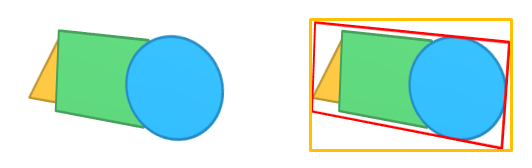
Finally, the third new rendering upgrade was the introduction of a bitmap cache that can be applied to a UIElement. When a UIElement is flagged for being bitmap cached, the same kind of intermediate surface rendering and hardware accelerated compositing is performed as for elements with 3D transformations or pixel shaders. The contents of bitmap cache elements are also rendered once and kept on a bitmap that is later composited. This can improve performance vastly for complex controls with many interlocking pieces: instead of computing and re-rendering the entire contents every time, the bitmap cache is used.
This of course has some visible effect. If you instruct Silverlight to use a bitmap cache, and then you zoom-in the contents, you will see the result get pixelated. You can learn more about this on the BitmapCache documentation.
Moonlight's New Rendering Pipeline and GPU Acceleration
Both effects and projections can be implemented purely in software. Effects can be implemented by providing a small interpreter for HLSL code and projections by performing the rendering in software and compositing the results.

David Reveman, the hacker behind Compiz joined the Moonlight team last year to implement the new rendering primitives, but also to figure out how we could hardware accelerate Moonlight. The results of his work are available on yesterday's release of Moonlight 4.
The rendering pipeline was modified. Now, whenever a UIElement has either a Projection, an Effect or has the the flag BitmapCache set the entire UIElement and its children are rendered into a surface that is then off-loaded for the GPU to render.
When OpenGL is available on the system, the composition of UIElements is entirely done by the GPU.
Moonlight will use the GPU to accelerate for compositing, perspective transformations and pixel shaders if the hardware is present without having to turn this on. Silverlight by default requires developers to opt into hardware acceleration and has its own set of features that it will hardware accelerate.
In general, Moonlight uses the GPU more than Silverlight does, except in the case of DeepZoom, where we still do not accelerate this code path.
Gallium3D
Our new rendering pipeline is built using OpenGL and Gallium3D.
Gallium is an engine that is typically used to implement OpenGL. In our case, we use the Gallium3D API when we need to fallback to software rendering 3D transforms on Linux. Otherwise we go through the OpenGL pipeline:
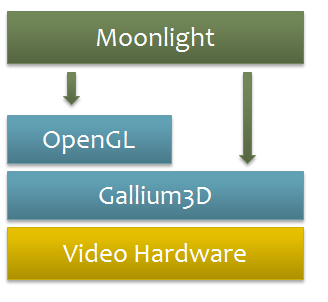
If we were to only support Linux/X11, Gallium3D would have been a better choice for us. But we want to allow the Moonlight runtime to be ported to other windowing systems (Like Wayland on Linux) and other operating systems.
Room for Growth
Now that we have this 3D accelerated platform in place, it is easy to fine-tune specific UIElements to be hardware accelerated.
This first release did only the basics, but we can now trivially use hardware decoders for video and have that directly composited in hardware with the rest of a scene, or we can offload image transformations entirely to the hardware on a type-by-type basis and of course, DeepZoom.
Object Lifecycle
Objects in moonlight live in two spaces, low-level components live in C++ and are surfaced to C#. Typically this means that we have code that looks like this in C++:
	//
	class MyElement : public UIElement {
	  protected:
		MyElement ();
	  private:
	        // fields and methods for MyElement go here
	}
In C# we create a mirror, like this:
	public class DependencyObject {
		// Points to the C++ instance.
		IntPtr _native;
	}
When a user wrote in C# "new MyElement", we would P/Invoke into C++ code that does "new MyElement", get a pointer back to this instance and store it in the "_native" field.
In the other direction, if we created a C++ object and then we had to "surface" it to the managed world, we would initialize the object based on our C++ "this" pointer.
We could create instances of MyElement in C++, and when this instance needs to be surfaces to the managed world, we would create an instance of the managed object, and store the pointer to the underlying C++ object in the _native pointer.
In the Moonlight 2.0 days we used to have C++ objects that would only create managed objects on demand. At the time, we did this to avoid creating thousands of managed objects when loading a XAML file when only a handful of those would be controlled by user code.
The Moonlight runtime, running in pure C++ code, surfaced objects to the C# world and we tracked the object life cycle with good old reference counts. But with Silverlight 2, we started to see problems with the design as it was possible to end up with cycles. These cycles did not happen only in the C++ side or the C# side, but they spanned the boundaries. This made it very hard to debug and it made it hard to keep Moonlight from not leaking memory.
Templates for example could create these cycles.
With Moonlight 4, we have landed a new life cycle management system that works like this:
- Every C++ object that we create always points to a managed counterpart. Gone are the days where the managed peer was created only when needed.
- Every C++ instance field that points to a DependencyObject subclass goes through this cool C++ templated class that notifies managed when the reference changes.
- There are no ref/unref pairs surrounding stores to instance fields in c++ anymore.
Now our base class in C++ has this:
	// Our entire hierarchy exposed to managed code
	// derives from EventObject
	class EventObject {
        	GCHandle managed_handle;
	}
Now all the c++ objects exist and are kept alive solely by their managed peers (there are some rare exceptions for things like async calls) and the whole graph is traversable by Mono's GC because all stores to c++ instance fields result in a managed ref between the respective peers.
With the new code, we no longer live in a world of refs/unrefs (again, except for some rare cases) and whenever we assign to a C++ field that points to a managed object we notify the managed peer of the change.
We were not able to ship Moonlight 4 with our new garbage collection system (Sgen) as we ran into a couple of hard to track down bugs at the last minute, but we are going to switch it on again soon.
Future Work
There is still room for improvement, and now that we know how to cook this kind of code, the goal is to use Mono's new GC in Moonlight more extensively.
We want to teach SGen to scan the C++ heap and track references to managed objects, dropping another potential source of problems and reducing the code needed. We would also love to go back to only creating managed objects on demand.
Platform Abstraction Layer
Moonlight was originally designed as a Linux-only, X11-only plugin for rendering Silverlight content. Developers constantly ask us whether they could run Moonlight on platform XX that is either not Linux or does not use X11.
The amount of work to port Moonlight 2 to those kinds of scenarios was so overwhelming that most people abandoned the efforts relatively quickly.
With Moonlight 4, we have introduced a new platform abstraction layer that will make it simpler for developers to port the Moonlight engine to other platforms.
Whether you want hardware accelerated user experiences in your video game or you want to put Moonlight on a the FreezeMaster 10000 Domestic Fridge with an Internet Connection and SmoothStreaming running on a barebones ARM CPU, you can now enjoy this in the comfort of your home.
We have done some minimal tests to exercise the API and can run the Moonlight engine on both MacOS and Android. You can look at exclusive footage of the animation test suite running on OSX and on Android.
If you are like me, not much of a click-on-the-video kind of person, and would rather get a screenshot, you can bask on the smooth colors of this screenshot on Android or in this delightful test on MacOS.


We are currently not planning on completing that work ourselves, so this is a fabulous opportunity for a caffeine-driven hacker to complete these ports.
Some possibilities, from the top of my head include being able to use Silverlight to design parts of your user experience for apps on the Mac AppStore (think MoonlightView in your MonoMac apps), or for your Android app.
Using Expression beats coding cute animations and futuristic UIs by hand. That is why every major video game embeds ScaleForm, the embeddable Flash runtime for handling the UI.
New XAML Parser
Our original XAML parser was written in C++, this worked fine for Moonlight 1, but with Moonlight 2 it started to become obvious that we were spending too much time calling back from C++ to C# to create managed objects.
This was acceptable up to version 2, but it no longer scaled with Moonlight 3. Too much time was spent going back and forth between the C++ world and the C# world. Those following the development of Moonlight would have noticed that every couple of weeks a new extra parameter to the xaml_load function was added to deal with yet another callback.
The new XAML parser is entirely written in C#, is faster and more reliable.
And lots more
Check out our release notes for Moonlight 4 Preview 1.
Posted on 16 Feb 2011
Three Months and Ten Days
 That is the time between our last major Mono release and
the new hotness: Mono 2.10.
That is the time between our last major Mono release and
the new hotness: Mono 2.10.
New in this release:
- Google Native Client Support
- New Profiler engine, it is beyond amazing.
- Faster socket stack
- Improved Parallel Framework
- Our SGen GC now supports Precise Stack Scanning and has been further fine tuned to increase our performance.
- Unified MonoTouch/Monodroid runtime support
- New Cecil/Light API is faster and lighter
- New C# Compiler backend (can now use any custom mscorlib)
- VB Compiler can now compile to both 2.0 and 4.0 profiles.
- Supports ASP.NET MVC3, Razor and new WebPages.
- New WebMatrix.Data database API.
- Improved OSX Mono
- F#, IronRuby and IronPython are now bundled in OSX and packaged for Linux.
Check out our Mono 2.10 release notes for all the details.
Posted on 16 Feb 2011
Nokia Simplifies the Mobile Landscape
On Friday, Nokia announced that they were adopting WP7 as their operating system. Although some open source advocates might see this as a set-back for Linux, Android is already the best-selling Linux OS of all times. Meanwhile, as a Ben Zander student, all I see is possibility and the the world of opportunities that this opens to developers.
Although they will continue shipping Symbian for a while, they are effectively sun-setting it. Just like you can still purchase Itanium systems from HP, nobody really develops for those anymore.
Nokia had this chart to offer on Friday:
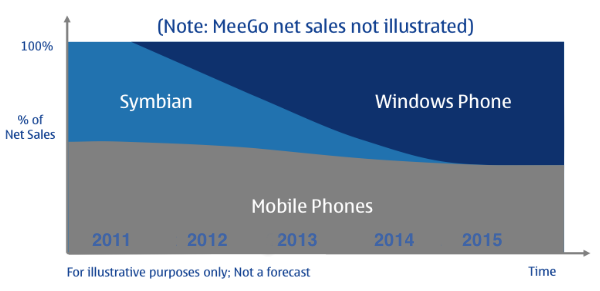
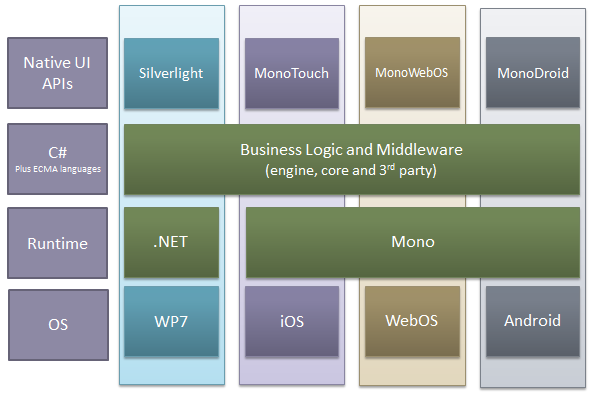
This is fascinating turn of events for C# developers as Nokia will make WP7 more relevant in the marketplace, making C# the lingua-franca of all major mobile operating systems. This astute chart explains why I am basking in joy:
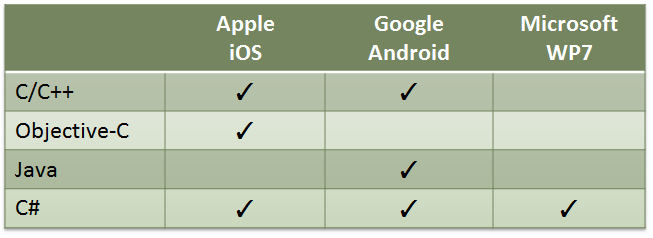
C# and the ECMA CLI everywhere!
Now, certainly lots of developer houses can afford to build their software once for each platform. This is fine if your VC has a mandate to "spend that cash quickly" or if you have a surplus of interns at your disposal.
Now, if trollcats have taught us one thing is that users like the UI of their apps to be as native as possible. That is, mind-blowingly beautiful on iOS and try to match the carpet on the others.
Other snake oil vendors will tell you that you can use the same code across all platforms and still deliver an emotional experience to your users. I agree, you can deliver the same emotion of disgust when using a cross platform toolkit.
With Mono we have taken a different approach, based on our own failures from the past. We give developers access to all of the native APIs in the platform to create the best possible user experience, and exploit every single last bit of functionality available on the platform.
We advise our users to split their user interface code from the engine, or their business logic. Developers should create a native experience for their mobile apps: one per platform. For example, consider Angry Birds on iOS and Angry Birds on Blackberry. Each version adapts to provide the best user experience available on the platform.


This is a grand time to be a mobile developer. This chart illustrates the elegant balance of native experience and code sharing available to C# developers:
Update: As much as I have enjoyed responding to the comments on this blog post, the comments are now closed. I will make an exception with anyone that wants to follow up on an existing discussion. For everyone else, if you have something to share, write it on your blog.
Posted on 14 Feb 2011
On Reflector
Red Gate announced that their Reflector tool would soon become a paid-for app. A few years ago they bought the rights to Reflector from Lutz Roeder and started maintaining two editions of the product: a free version and a commercial version with extra features. Many people in the .NET community feel unhappy about that decision.
Whether Red Gate's decision is good or not for them is up to other blogs to discuss. I am grateful that over the years Reflector ran with Mono's Windows.Forms implementation and that the maintainers were careful to keep the code running with Mono.
Of course, I would always like more an open source equivalent to a proprietary tool, and while Reflector was a free download, it was never open source.
Some believe that in response to the announcement we created a competitor to Reflector. We did not.
We have had a decompiler in Mono for a few years now. First, we had a decompiler contributed to MonoDevelop by Andrea and we later replace it with the one that was developed by JB Evain:
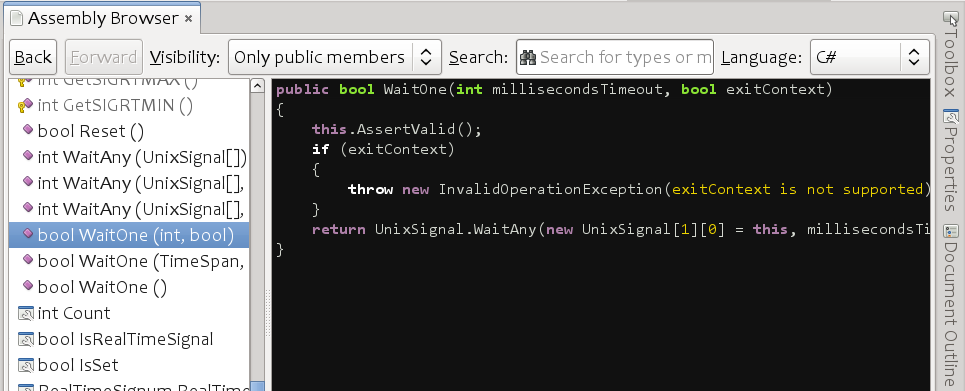
The current decompiler in MonoDevelop actually originated not as a decompiler, but as a flow-analysis tool in 2005. It was part of db4Object's Native Queries. Native Queries were a way of getting some of the benefits of LINQ without any compiler support. It worked by reassembling the AST at runtime from a stream of IL instructions. For example, you could use the following C# code to query a database:
IListpilots = db.Query (delegate(Pilot pilot) { return pilot.Points == 100; });
The Query method would decompile the code in the delegate and reconstruct the abstract syntax tree and determine that the expression to query was pilot.Points == 100.
JB Eventually expanded hi IL Manipulation library Cecil to contain a decompiler built based on the ideas of flow analysis. JB described this back in December of 2008 as part of a Hack Week followed by a hack-a-thon:
During the last Hack-Week, I started refactoring Cecil.FlowAnalysis, and since then, I’ve been working pretty seldom on it. It was last month that I decided to give it a kick, and even took a week of vacations to organize a CodeCamp with friends to give it a boost and have fun altogether
The decompiler is just one of the various tools built with Cecil and has been a standard component of MonoDevelop for a long time (it is part of MonoDevelop 2.4).
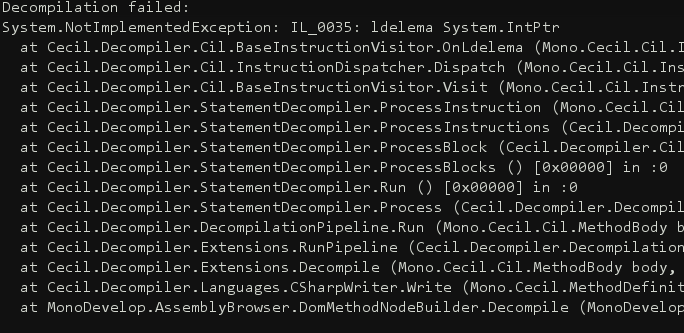
Although yesterday in response to the announcement, a WPF UI was created for the Cecil.Decompiler.dll, this is not the only effort. There is also an older Cecil Studio that uses Windows.Forms that was created a few years ago and of course, our own MonoDevelop assembly browser.
We welcome contributions to the decompiler for people interested in improving the core, regardless of their preference for a UI built on top of it:
That being said, JB has been working on a new system that goes beyond decompilation and will be demoed at QCon next month. Stay tuned for his demo.
Posted on 04 Feb 2011
Blog Search
Archive
- 2024
Apr Jun - 2020
Mar Aug Sep - 2018
Jan Feb Apr May Dec - 2016
Jan Feb Jul Sep - 2014
Jan Apr May Jul Aug Sep Oct Nov Dec - 2012
Feb Mar Apr Aug Sep Oct Nov - 2010
Jan Feb Mar Apr May Jun Jul Aug Sep Oct Nov Dec - 2008
Jan Feb Mar Apr May Jun Jul Aug Sep Oct Nov Dec - 2006
Jan Feb Mar Apr May Jun Jul Aug Sep Oct Nov Dec - 2004
Jan Feb Mar Apr May Jun Jul Aug Sep Oct Nov Dec - 2002
Jan Feb Mar Apr May Jun Jul Aug Sep Oct Dec
- 2022
Apr - 2019
Mar Apr - 2017
Jan Nov Dec - 2015
Jan Jul Aug Sep Oct Dec - 2013
Feb Mar Apr Jun Aug Oct - 2011
Jan Feb Mar Apr May Jun Jul Aug Sep Oct Nov Dec - 2009
Jan Feb Mar Apr May Jun Jul Aug Sep Oct Nov Dec - 2007
Jan Feb Mar Apr May Jun Jul Aug Sep Oct Nov Dec - 2005
Jan Feb Mar Apr May Jun Jul Aug Sep Oct Nov Dec - 2003
Jan Feb Mar Apr Jun Jul Aug Sep Oct Nov Dec - 2001
Apr May Jun Jul Aug Sep Oct Nov Dec