GUADEC
Just got back to Boston from GUADEC. It was extremely fun and energizing, just like last years. It is a shame I had to leave early the conference.

And the Band Played On
This year, there was a cover band made up of GNOME hackers and they did a fantastic job keeping us entertained at the Maemo/Nokia party, congratulations to the Macaques!
Beagle
As part of my upgrade to SLED 10, SUSE's new enterprise Linux desktop am finally a full-time Beagle user.
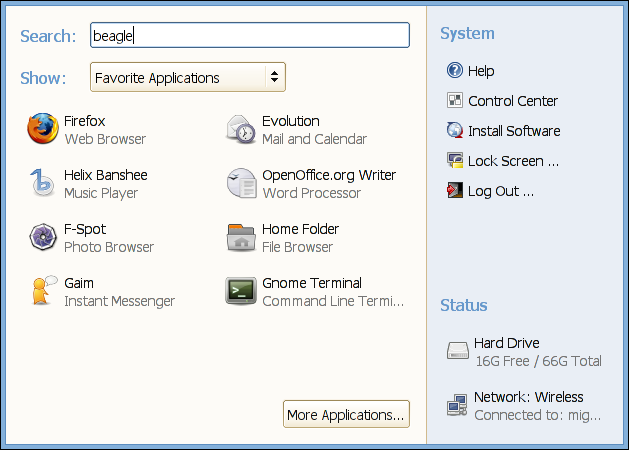
Finding your documents and discovering information you did not even remember you had, playing $HOME archaeology, has been a very pleasant experience.
Although Beagle is fantastic, it needs a little bit of tuning for my day to day use.
Am a heavy email user, I have seven gigabytes of email in my laptop, and Beagle has a bad habit of optimizing the Evolution index files every 10 minutes if something has changed. And the optimization process hammers my machine very, very hard, to the point of not letting me get work done for a few minutes.
I spoke to Joe, and he said "it happens about every 15 minutes or so", armed with this information I found the problem, the Beagle.Daemon.ScheduleOptimize routine has a 10 minute delay to run the query again.
I tried rebuilding my modified Beagle from CVS, but CVS has new dependencies that I lack, so I decompiled the BeagleDaemonLib.dll, like this:
$ export MONO_PATH=/usr/lib/beagle:/usr/lib/mono/gmime-sharp/
$ monodis /usr/lib/beagle/BeagleDaemonLib.dll > a.il
$ vi a.il
   # Replace the ldc.r8 10. in ScheduleOptimize
   # with ldc.r8 100. for a 100 minutes.
$ ilasm /dll a.il
$ mv a.dll /usr/lib/beagle/BeagleDaemonLib.dll
This has brought up my machine back to usable for me.
There are a few other glitches here and there, but the Beagle team is aware of these. Beagle and Beagle-based applications have a lot of promise, I just hope that the core gets a few passes of love, improvements and small touch-ups before they jump on to new, innovative ideas.
Avalon, WPF and Michael Zucchi
Michael has started a blog about his experiences using Avalon/WPF on Windows. Michael was one of the main developers in Evolution while at Ximian and is now working in Australia hacking on WPF.
His comments on WPF are interesting. His regular blog has had some negative comments about it in the past and his new blog has some more.
I do not have as much experience as Michael has with Avalon/WPF, but I wrote about the complexity of the framework a few years ago (here and here).
Although Michael is not involved in Mono, I have added his blog to the Monologue blog aggregator as his comments are very interesting.
MonoDevelop
Lluis Sánchez demoed the new developments of MonoDevelop at the conference.
What was interesting about Lluis' presentation is that I did not know about half the features that MonoDevelop has. I was blown away. Specially, since am Lluis' manager and I read every status report, and try to read most of the MonoDevelop patches, but I did not know that MonoDevelop had all this magic behind it.
I knew we had Stetic integration in MonoDevelop, but the integration goes beyond generating the UI for applications. The Stetic/MonoDevelop integration uses the refactoring engine to add method handlers for signals (double-click on signal) and if you change the names of your widgets in the designer, the source code that references it is updated. It also has a number of nice touch-ups that went into SVN recently, like a context-sensitive toolbar which has the most common operations in a per-widget basis.
JPR raised some concerns, because this "smelled" similar to Glade's "Generate code" feature, but it is very different. The model that MonoDevelop uses for Stetic/C# integration is more similar to Glade and XML, it just happens to not use XML at runtime.
The MonoDevelop model is more or less like this, for each "UI" element (custom widget, dialogs or windows):
- A MyGUI.cs contains all the event hooks, top-level
class handler for the given UI component. This code
contains a call to Stetic.Gui.Build (this,
typeof(MyGUI)).
This is the equivalent of loading your Glade file in the Glade world. - A gtk-gui/MyGUI.stetic contains the representation used by Stetic to manipulate the UI. This is not used at runtime, its only used by Stetic to load and save the UI.
- During compilation the gtk-gui/MyGUI.stetic produces a gtk-gui/generated.cs file that contains the code to create all the GUI widgets and hook up all the events.
So you are free to add and remove as much code as you want to your MyGUI.cs file, that file is never touched by MonoDevelop.
He also demonstrated creating custom widgets, and how these could be kept on a separate library that MonoDevelop can load into the GUI designer, the steps are:
- Add a "New Project" to your solution, select "Library".
- In the library, select "Add New Widget", develop your new widget, debug it, test it. When you are ready.
- On the main project (or every project that consumes your library), right click on "References". Select "Projects" and click on the Library you want to incorporate.
- The new widget appears on the widget palette, you can now drag it and use it in your main application.
Finally, he demonstrated the "Deployment" feature, which produces an automake/autoconf setup and produces a tarball that is ready for redistribution. There is talk about doing a "deploy to RPM" and "deploy to DEB" functionality right into the IDE.
Posted on 30 Jun 2006
GUADEC for Latin Americans and Asians
Rodrigo points out that GUADEC in Europe is an expensive conference for those coming from Latin America and Asia. Not only is the travel had to afford for those folks, but even if they manage to pay for it, their expenses in Europe are sometimes hard to afford:
People from Latin American countries (and I guess Asia and Africa) find Europe quite expensive, so for them going out for lunch/dinner with US, Australia and Europe people is unaffordable, which makes them having to go on their own to look for cheaper places. So, I think it would be a great idea if we had, like in Copenhagen, free lunch for everyone at the venue. Thus, everyone, regardless of the country they are from, would have lunch together, making it easier for everyone to meet and talk.
Anne had a couple of good ideas (or someone suggested this on the GUADEC list). They were:
- Make the "E" in GUADEC stand for "Everywhere". Host the next GUADEC conference in Latin America or Asia. Travel to Latin America and Asia is affordable for Europeans and Americans.
- If we continue in Europe, use some of the money to provide stipends to pay for some of the travel expenses for those who need it.
Posted on 30 Jun 2006
New Toolkit for Rich Web Applications
The other day I ran into Jitsu, a new toolkit for creating Ajax-y applications.
Jitsu takes an interesting approach in the Ajaxy space.
Posted on 28 Jun 2006
Mexico, Elections
Am going back to Mexico to vote on this Sunday's election.
Am voting for Andrés Manuel López Obrador (AMLO/PRD).
The smear campaign against AMLO has been quite intense, a few mexicans in Barcelona told me the most amazing stories. The rumors being spread include "If AMLO wins, four families will be forced to live in an appartment", "AMLO is being financed by Fidel Castro", "If AMLO wins, you will only be able to buy food with food coupons from the state".
It sounds like a list of recycled cold-war era propaganda.
That's the kind of thing you have to make up, when your candidate gets caught up in a corruption scandal using a creative setup and mis-using federal information.
More videos: here.
Posted on 28 Jun 2006
GUADEC Conference: Mono and Gtk# Q&A Rescheduled
I had a conflict of schedule (my plane leaving Barcelona two hours before my talk at GUADEC) and the organizers were kind enough to reschedule the Mono and Gtk# Q&A session at GUADEC to be on Monday instead of Thursday.
The session will be held in the "Sala de Actas" (Room #2) at 7pm on Monday 26th.
Posted on 25 Jun 2006
Microthreading with Mono
 Jim Pubrick has written an interesting
blog entry detailing how they are using Mono on Second
Life. Second Life is going to use Mono to run the
user-provided scripts with native code (which am told can be
up to 150 times faster than the current engine).
Jim Pubrick has written an interesting
blog entry detailing how they are using Mono on Second
Life. Second Life is going to use Mono to run the
user-provided scripts with native code (which am told can be
up to 150 times faster than the current engine).
SecondLife is using Mono in a non-conventional way, which I like to think is one of the benefits of having an open source engine, they have added a micro-threading implementation.
Microthreading was necessary because some of their simulations are made up of thousand of threads/routines, and using the default threads in Mono (which are mapped to operating system threads) would have been too heavy.
Their micro-threading implementation is different than Tomi's recent continuation work in that Second Life has added support to "migrate" running code across machines.
A presentation from the Second Life folks at Google Tech Talks.
Posted on 07 Jun 2006
Zombo, invite needed
If anyone has an invite to Zombo.Com please email it to me.
Posted on 07 Jun 2006
Boston Progressive Fix
For your progressive needs, this week has a couple of interesting events in Boston:
- Noam Chomsky will present his new book "Failed States" tomorrow at 6pm in First Parish Church.
- Friday and Sunday at the Boston International
Film Festival "Occupation 101", the movie I have
been waiting to see for years. See the schedule
for times.
I will probably go to the Friday show. - Update: Chris Toshok, FBI most-wanted 2004 man and developer extraordinaire, provides the transcript of Stephen Colbert's 2005 Commencement Address.
Posted on 05 Jun 2006
Al Gore's new Movie.
 Tonight Laura, Duncan and myself went to watch "An Inconvenient
Truth", featuring Al Gore as he presents his case for
action to stop global warming.
Tonight Laura, Duncan and myself went to watch "An Inconvenient
Truth", featuring Al Gore as he presents his case for
action to stop global warming.
The movie, which follows Al Gore through as he delivers the same speech over and over around the globe had everyone in the movie theather glued to their seats.
As the before and after images start rolling and the graphs and numbers of warming in the planet and the pictures of large chunks of ice the size of entire states start thawing the sense of urgency grows.
By the end of the movie not only everyone was applauding, but stayed seated as the credits and some extra messages kept rolling and applauded again. Few movies have that effect on people.
I highly recommend it.
Here is the YouTube Trailer.
Now, when I got home I Googled for the movie, to find the web site, and one of the sponsored link ads pointed to "Friends of Science" (not linking to them), which has a section on "Myths and Facts" about Global Warming. The section on Myths and Facts probably were strong enough a few months ago. They probably managed to make some people doubt the negative effects of Global Warming, but compared to the arguments put forth by Al Gore in the movie they just represent a radiography of the kind of shady discourse that passes as science and debate nowadays.
Some extra googling landed me at a site that has actually done a littble bit of research about who exactly these "Friends of Science" are, basically astroturfers.
In addition, last night we watched the PBS documentary on the AIDS epidemic (now you can watch it online). Both Bill Clinton and Al Gore appear on the documentary. After listening to both of them, Clinton very articulate and passionte, and Gore making the case in front of the Security Council on a health issue Laura turned and asked me "And this is the guy they tried to impeach?".
Addendum:
Posted on 03 Jun 2006
Nearly all Binary Searches are Broken
Duncan pointed me today to this blog entry from Google Research: "Extra, Extra - Read All About It: Nearly All Binary Searches and Mergesorts are Broken".
Fascinating read.
Posted on 03 Jun 2006
Blog Search
Archive
- 2024
Apr Jun - 2020
Mar Aug Sep - 2018
Jan Feb Apr May Dec - 2016
Jan Feb Jul Sep - 2014
Jan Apr May Jul Aug Sep Oct Nov Dec - 2012
Feb Mar Apr Aug Sep Oct Nov - 2010
Jan Feb Mar Apr May Jun Jul Aug Sep Oct Nov Dec - 2008
Jan Feb Mar Apr May Jun Jul Aug Sep Oct Nov Dec - 2006
Jan Feb Mar Apr May Jun Jul Aug Sep Oct Nov Dec - 2004
Jan Feb Mar Apr May Jun Jul Aug Sep Oct Nov Dec - 2002
Jan Feb Mar Apr May Jun Jul Aug Sep Oct Dec
- 2022
Apr - 2019
Mar Apr - 2017
Jan Nov Dec - 2015
Jan Jul Aug Sep Oct Dec - 2013
Feb Mar Apr Jun Aug Oct - 2011
Jan Feb Mar Apr May Jun Jul Aug Sep Oct Nov Dec - 2009
Jan Feb Mar Apr May Jun Jul Aug Sep Oct Nov Dec - 2007
Jan Feb Mar Apr May Jun Jul Aug Sep Oct Nov Dec - 2005
Jan Feb Mar Apr May Jun Jul Aug Sep Oct Nov Dec - 2003
Jan Feb Mar Apr Jun Jul Aug Sep Oct Nov Dec - 2001
Apr May Jun Jul Aug Sep Oct Nov Dec